I have problems with Aero in Windows 7, how to fix and activate it?
If you have problems with Aero in Windows 7, to fix and activate it, please start the "Find and fix Aero Problems" in Win-7.
The aero problem on Windows occurs especially when a hardware component has been reinstalled. Especially graphics card or video card drive. Unlike Windows 10 because there is no Aero, you can adjust / activate it in Windows 7!
To open the Aero troubleshooter, click through the following button:
Aero-Problem about the Windows 7 problems handling (Troubleshooting)!
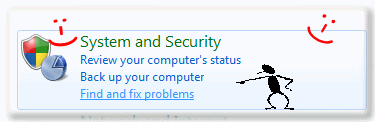
(Image-1) Find and fix Aero Problems in Windows 7
Start the "Control Panel" over "Start" "Control Panel"
Select in the "System and Security" (Image-1)
the option "find and fix problems"
or "Control Panel"
>> >> "All Control Panel Items"
>> >> >> "Action Center"
>> >> >> >> "Troubleshooting"
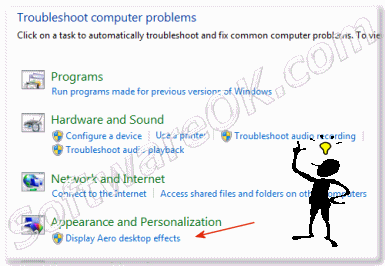
(Image-2) Display Aero desktop effects
In the window "Troubleshoot computer problems"
click on "Display Aero desktop effects".
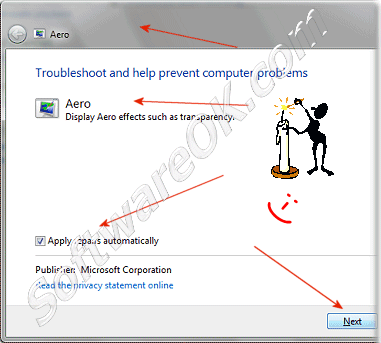
(Image-3) Troubleshoot and help prevent computer problems
In the next window "Troubleshoot and help prevent computer problems"
click on "Aero" or "Next".
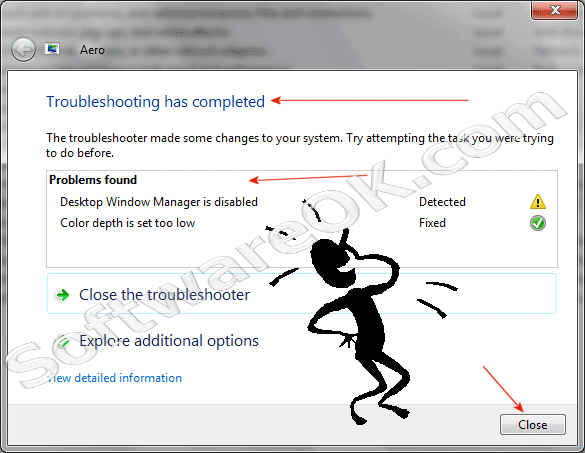
In the next Window "Troubleshoot has completed"
can you see the Troubleshoot report and "Issues found Detection details".
(Image-4) Windows 7 - Aero Troubleshooting has completed
Example Report:
# Aero Publisher details
* Issues found
Detected
Desktop Window Manager is disabled
The Desktop Window Manager must be enabled in order to display Aero desktop effects such as transparency.
Completed
Enable the Desktop Window Manager
* Color depth is set too lowColor depth is set too low
Fixed
To render Aero effects, the color depth must be set to 32 bits.
Completed
Increase color depth
# Potential issues that were checked
The current theme doesn't support AeroThe current theme doesn't support Aero
Issue not present
The current theme Unsaved Theme doesn't support Aero desktop effects such as transparency.
Video card doesn't support required display settingsVideo card doesn't support required display settings
Issue not present
Your video card doesn't support DirectX 9.0 or higher,
Pixel Shader Model 2.0 or higher, or doesn't have sufficient memory or memory bandwidth required to display Aero effects such as transparency.
Mirror drivers don't support Aero effectsMirror drivers don't support Aero effects
Issue not present
A running program uses a mirror driver
(a type of display driver) which is not compatible with the Aero desktop experience.
Current power settings don't support Aero desktop effectsCurrent power settings don't support Aero desktop effects
Issue not present
The Power Saver plan helps conserve power,
and starts when your computer is running on battery power. When running your computer on battery power, Windows conserves power by disabling visual effects such as the Aero desktop experience.
Aero effects not supported on this Windows editionAero effects not supported on this Windows edition
Issue not present
Some Aero features such as transparency
are not included on certain Windows editions.
Themes service isn't runningThemes service isn't running
Issue not present
Starting the Themes service will enable Aero desktop effects such as transparency.
Transparency is disabledTransparency is disabled
Issue not present
Transparency must be enabled in order to display transparent window borders.
Desktop Window Manager Session Manager service isn't runningDesktop Window Manager Session Manager service isn't running
Issue not present
The Desktop Window Manager Session Manager service
and the Desktop Window Manager process are used to display Aero desktop effects such as transparency. The service or process is currently stopped.
Video card driver doesn't support Aero effectsVideo card driver doesn't support Aero effects
Issue not present
The current video card driver isn't compatible with the Windows Display Driver Model (WDDM).
The Windows Experience Index has not been computedThe Windows Experience Index has not been computed
Issue not present
The Windows Experience Index base score measures the capability of your computer's hardware and software configuration and is one of many factors that determine whether the Aero desktop effects can run.
# Issues found Detection details
Desktop Window Manager is disabled Detected
The Desktop Window Manager must be enabled in order to display Aero desktop effects such as transparency.
Completed
Enable the Desktop Window Manager
Enabling the Desktop Window Manager will enable Aero effects such as transparency.
Fixed
Color depth is set too low
To render Aero effects, the color depth must be set to 32 bits.
Color depth settings
Color setting requirements.
Depth: 16 bits
Required depth: 32 bits
Primary monitor: True
Completed
Increase color depth
Increasing the color depth to 32 bits will enable Aero desktop effects such as transparency to be displayed.
Potential issues that were checked Detection details
Issue not present
The current theme doesn't support Aero
The current theme Unsaved Theme doesn't support Aero desktop effects such as transparency.
Theme settings
Service status: running
Theme: Unsaved Theme
Visual style: Aero.msstyles
Issue not present
Video card doesn't support required display settings
Your video card doesn't support DirectX 9.0 or higher, Pixel Shader Model 2.0 or higher, or doesn't have sufficient memory or memory bandwidth required to display Aero effects such as transparency.
Windows display assessment
The file contains display related information based on the latest assessment.
File Name: features.xml
Issue not present
Mirror drivers don't support Aero effects
A running program uses a mirror driver (a type of display driver) which is not compatible with the Aero desktop experience.
Issue not present
Current power settings don't support Aero desktop effects
The Power Saver plan helps conserve power, and starts when your computer is running on battery power. When running your computer on battery power, Windows conserves power by disabling visual effects such as the Aero desktop experience.
Power settings
Details of power source and active power scheme.
Source: Outlet
Active scheme: a1841308-3541-4fab-bc81-f71556f20b4a (Power saver)
Issue not present
Aero effects not supported on this Windows edition
Some Aero features such as transparency are not included on certain Windows editions.
Issue not present
Themes service isn't running
Starting the Themes service will enable Aero desktop effects such as transparency.
Issue not present
Transparency is disabled
Transparency must be enabled in order to display transparent window borders.
Issue not present
Desktop Window Manager Session Manager service isn't running
The Desktop Window Manager Session Manager service and the Desktop Window Manager process are used to display Aero desktop effects such as transparency. The service or process is currently stopped.
Issue not present
Video card driver doesn't support Aero effects
The current video card driver isn't compatible with the Windows Display Driver Model (WDDM).
Issue not present
The Windows Experience Index has not been computed
The Windows Experience Index base score measures the capability of your computer's hardware and software configuration and is one of many factors that determine whether the Aero desktop effects can run.
To open start, run, find the Disk-Management in Windows 7 There are several ways to open the Disk-Management in Windows 7. Here are 4 methods to open the
Yes Is It possible to turn off the Aero in Windows 7 to 100% on Pro and Home, Version W7 starter has no Aero. This permanent disable the Aero example is
No, uninstall of the Internet Explorer 11 or 8 in Windows 7 is not possible , but with this method you have an easy way to deactivate disable the Internet
Need to log in with no keyboard, the solution is very easy in MS Windows 10, 8.1, 7 not only on Tablet PCs and Desktop Computers and MS Surface Content:

 "Start"
 "Control Panel"
 "Action Center"
 "Troubleshooting"