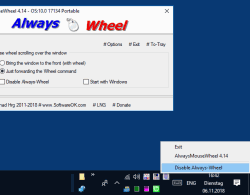
Meningkatkan roda tetikus fungsi, pada


tetingkap tetikus Windows 10, 8.1 dan 7 Improwe untuk menatal tetingkap mana pun, walaupun tetingkap itu tidak berada di latar depan, pada semua OS


HOME ► Micro-Staff ► AlwaysMouseWheel 6.55
About History Eula Images FAQ Download (112 KB) de DE en COM en EU
Update on: 23 October 2025
Suitable for : Windows 11, Windows 10, 8.1, 7, ... , Server 2012-2025, 2022, x64, x32, x86
-
Allows Mouse Wheel in inactive Window
... Download (112 KB)
... FAQ


[ :( ]

String List AlwaysMouseWheel: Malay  


##=Malay   Malaysia

TranslatorName=Washington


20=Keutamaan
21=Mulakan dengan Windows
22=Semasa roda tetikus bergulir ke atas tingkap
23=Bawa tingkap ke depan (dengan roda)
24=Hanya meneruskan arahan Roda
25=Lumpuhkan Sentiasa Roda

26=Pilihan
27=Minimumkan ke dulang jika Tutup Alt + F4
28=Sentiasa mula diminimumkan (ToTray)
29=Sentiasa mula tersembunyi
30=Minimumkan ke dulang jika Minimumkan
31=Sentiasa berada di Atas
32=Sembunyikan jika ditutup
33=Sembunyikan
34=Ke Dulang
35=Keluar

40=Gunakan sebagai kawalan kelantangan ketika roda tetikus di bar tugas
41=Tunjukkan kawalan kelantangan
42=Sumbang
43=Hidupkan Speaker secara automatik (Garis keluar)

50=Gunakan [Alt + butang kiri tetikus] untuk menggerakkan tingkap dengan menyeret
51=Gunakan [Alt + butang kanan tetikus] untuk mengubah ukuran tingkap

53=Gunakan snap windows semasa memindahkan windows

60=Kecualikan Program
61=Sila masukkan dalam senarai nama program, yang akan dikecualikan dari ciri AlwaysMouseWheel mis. (excel.exe).

63=Lumpuhkan AlwaysMouseWheel dalam mod Metro
64=Lumpuhkan pada butang tetikus kanan
65=Lumpuhkan pada butang tetikus kiri
66=tatal kiri kanan dengan kekunci shift


* Scroll via mouse wheel even if the window is not in the foreground ergo focused!


About History Eula Images FAQ Download (112 KB) de DE en COM en EU
# Thanks+
Windows


[ :( ]


  + Freeware
  + Order on the PC
  + File management
  + Automation
  + Office Tools
  + PC testing tools
  + Decoration and fun
  + Desktop-Clocks
  + Security

  + SoftwareOK Pages
  + Micro Staff
  + Freeware-1
  + Freeware-2
  + Freeware-3
  + FAQ
  + Downloads

[ :( ]

  + Freeware
  + ShortDoorNote
  + AutoHideDesktopIcons
  + BlankAndSecure
  + NewFileTime
  + DesktopClock3D
  + PointerStick
  + DesktopImages3D
  + WinPing
  + GetPixelColor
  + PAD-s


Home | Thanks | Contact | Link me | FAQ | Settings | Windows 10 | gc24b | English-AV | Impressum | Translate | PayPal | PAD-s

 © 2025 by Nenad Hrg softwareok.de • softwareok.com • softwareok.com • softwareok.eu
44.979 msec.


>> ☕ Buy SoftwareOK a Coffee ☕ <<


► Where can I find out the Edge Chromium version!? ◄
► Copying a website address to a desktop computer? ◄
► The network path was not found on Windows 10 / 11! ◄
► Use the fonts without installing the font on Windows 11, 10, 8.1! ◄


This website does not store personal data. However, third-party providers are used to display ads,
which are managed by Google and comply with the IAB Transparency and Consent Framework (IAB-TCF).
The CMP ID is 300 and can be individually customized at the bottom of the page.
more Infos & Privacy Policy

....