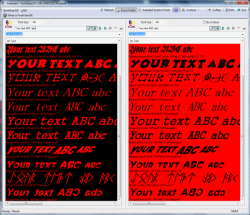
Overview of all installed and not installed fonts on Windows 11, 10, ... OS!
Update on: 11 April 2024
Suitable for : Windows 11, Windows 10, 8.1, 7, ... , Server 2012-2019, 2022, x64, x32, x86
The Font-View-OK, creates a quick visual overview of all installed fonts, or fonts from a certain folder and helps to compare the font.
The problem is well known: Only the written form is remembered, but the font name is forgotten. Here FontViewOK can help, to find the font name again. The deployment is so simple, a help file is not required. It is not the longest chocolate candy in the world but probably the fastest font overview Freeware Tool, is a popular user tool in the category Office on SoftwareOK
Key features in Font Viewer!
◆ Up to 1000 fonts per second
◆ Dual font preview for quick comparisons of fonts.
◆ Quick overview and comparisons of all fonts
◆ Compare not installed fonts
◆ Printing with print preview function
◆ Changeable font size, style and color
◆ List all fonts from a specific folder
Other Possibilities and Specification:
◆ Freeware
◆ Use the fonts without installing the font
◆ Multilingual
◆ portable
◆ ... and much more
About the font comparison:
In FontViewOK, there is a dual font preview for fast comparisons of two fonts. Well suited to have a direct comparison. The adaptation of the font is independent in both panels.
Why FontViewOK:
For web designers, webmasters and for those who experiment with fonts. But also just once out of curiosity or for testing: Which font is best suited to my name?, Which font type would harmonize to this heading?, ....
The help file is not necessary, I hope you will understand ;) !
An installation of FontViewOK is not required.
# FontViewOK Versions History
| New in version 8.41 // 11 April 2024
Improved recognition and display of non-TTC and TTF fonts from other folders.
Small adjustments and improvements have been made to the display of TTC and TTF fonts on Windows in the Font.View.OK app.
| New in version 8.38 // 30 September 2023
Corrections in the uninstallation routine of FontViewOK
Bug fix in x64 version
| New in version 8.33 // 17 August 2023
New code sign certificate for FontViewOK.exe
Important tests of the Font Viewer application for the next MS Windows 11/10 update
Update of language files in Font-View-OK
| New in version 8.21 // 13 June 2023
Small tests and adjustments for the new MS Windows 11 update
Updated language files in the font viewer for all Windows operating systems
| New in version 8.18 // 16 February 2023
Small improvements and update of the language files in the Font-View-OK tool
Faster reading of TTC, OTF font files
|
... complete Versions History
| # FontViewOK is multilingual and a popular program worldwide: |
Program Keys:
Supported Operating systems:
The Font comparison and preview tool is suitable for:
Windows 11, Windows 10, Windows 10 Pro, Windows 10 Enterprise, Windows 10 Home,
Windows 8.1, Windows 8.1 Enterprise and Pro, Windows 8, Windows 8 Enterprise and Pro,
Windows 7, Windows 7 Enterprise, Windows 7 Home Basic, Windows 7 Home Premium + Professional, Windows 7 Starter + Ultimate,
, X64, x86 and x32 all Windows, MS Windows Server 2019, 2016,2012, .
Font-View-OK FAQ:
1. How can I view (show) the not installed windows fonts?
2. How to view and use the fonts without installing the windows font file?
3. How can i view *.ttc fonts in not Windows Font folder?
4. Register all the fonts without installation, for other Windows programs, how to?
5. What brings the user the Dual View and cloning in the Font Viewer?
6. What I have to use Portable or X64, or ... of FontView OK?
7. The last 10 open fonts folder, use, compare, ...!
8. Compare two separate folders One is the SYSTEM font folder?
9. Delete fonts direct in FontViewOK (Windows Recycle Bin)!
10. I am a font lover but what purpose does the font reader button have?
11. Can I really give the font install / overview program to anyone?
* Overview of all installed and not installed fonts on Windows 11, 10, ... OS!
# Images+ # Info+ # Thanks+
|

 DE
DE COM
COM