
The URI "ms-settings:privacy-eyetracker" in Windows 10 und 11 leads to the privacy settings for accessing eye tracking data.
Eye tracking is a technology that allows the direction of a user's gaze to be captured and analyzed, which can be useful for various applications, including accessibility, research, and user experience. This privacy setting allows users to control which apps are allowed to access eye tracking data.
1. ms-settings:privacy-eyetracker
2. Availability under Windows
3. Other useful commands in the Windows settings
1. The Command ms-settings:privacy-eyetracker
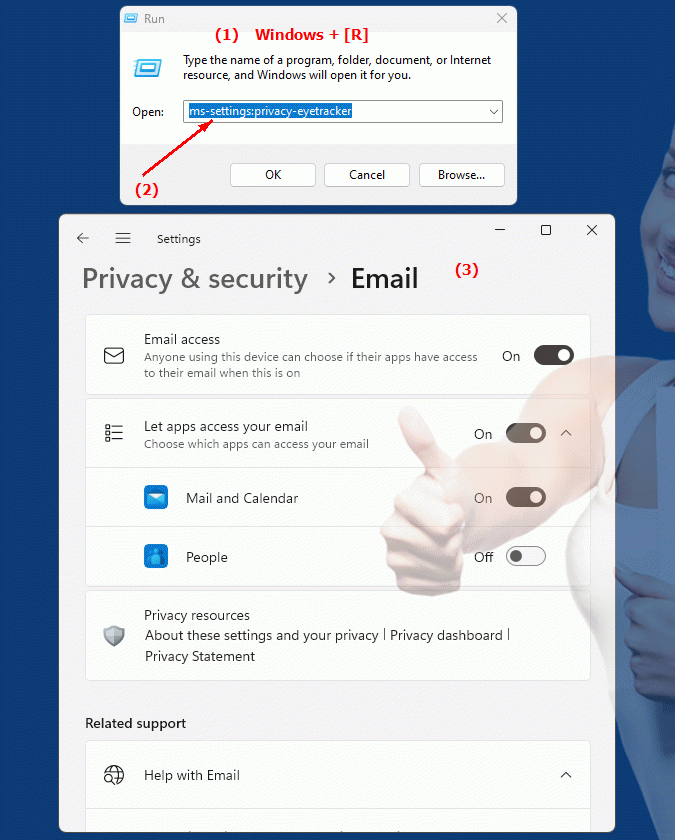
1. Press and hold Windows R to continue.2. To do this, simply use the command: ms-settings:privacy-eyetracker
(This command is also suitable for a desktop shortcut.)
3. Press the OK button or [Enter] to confirm.
(... see Image-1 Point 1 to 3)
You now have access to the settings mentioned in Windows 10, 11 or 12.
This can solve the following questions and difficulties.
1b. This can solve the following questions and difficulties.
Where can I find the settings for accessing eye tracking data in Windows?How do I configure permissions for apps that can access my eye tracking data?
Can I adjust app access permissions to ensure that only trusted applications can access my eye tracking data?
How do I change the privacy settings in the system to control access to my eye tracking data?
Can I view my current eye tracking data access settings to make sure they are configured correctly?
What impact do the changed privacy settings have on the functionality of applications that use eye tracking?
How secure is my data when I configure these settings? Does Windows provide protection against unauthorized access to private information?
Are there options to disable data access for specific applications or to allow it only under certain conditions?
Can I access eye-tracking privacy improvements with the latest versions of Windows?
2. It is available starting with the corresponding build numbers in Windows 10, 11 and 12!
Availability in Windows versions
1.Windows10:
- Availability:
The "ms-settings:privacy-eyetracker" URI is not available in Windows 10. Support for eye tracking privacy was only introduced in later versions of Windows.
- Build Number:
Since this URI is not available in Windows 10, there is no specific build number for this feature in this version of the operating system.
2.Windows11:
- Availability:
The URI "ms-settings:privacy-eyetracker" is available starting with Windows 11 version 21H2 (November 2021 Update). Windows 11 brought with it a number of new features and improved privacy settings, including those for eye tracking data.
- Build number:
The URI is available starting from build 22000 and above. This build number covers the initial release of Windows 11 that introduced privacy settings for eye tracking data.
3.Windows12:
- Availability:
With Windows 12, expected to be released in 2024, the "ms-settings:privacy-eyetracker" URI is expected to continue to be available. Windows 12 is expected to continue existing privacy settings for eye tracking data and may offer additional features.
- Build Number:
The exact build number for Windows 12 is not determined at the time of release, but the URI is expected to be supported starting with the first released build number of Windows 12.
Summary
The URI "ms-settings:privacy-eyetracker" provides direct access to the privacy settings for eye tracking data. It is available starting with Windows 11 version 21H2 and is expected to remain available in Windows 12. In Windows 10, this URI is not available, so there is no specific build number for this feature in Windows 10. In Windows 11, the URI is accessible starting with build 22000 and higher. The exact build number for Windows 12 will be determined with the release of the version.