Find similar or identical images on Microsoft Windows 11, 10, ... OS faster than ever!
Update on: 23 February 2026
Suitable for : Windows 11, Windows 10, 8.1, 7, ... , Server 2012-2025, 2022, x64, x32, x86
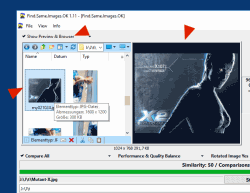
Find.Same.Images.OK is a software to find the same or similar images and to search for rotated (mirrored) or negative images.
You can use Find.Same.Images.OK to quickly find the same or similar images, whether those photos are rotated, mirrored, zoomed out Nice Tool from the category file management and office on SoftwareOK!
Key Features in Find Same Images OK!
◆ Folder vs. Folders and Compare All
◆ Find Similarity Images
◆ Quality and performance related
◆ Compare pictures in multiple folders
◆ Compare Camera Raw files
◆ Supports multiple image formats (JPEG, PNG, WMF, RAW, ...)
Other features and specifications:
◆ Does not burden the CPU
◆ Tiny in size but very fast
◆ Portable use possible
◆ Optional installation
◆ Easy to use
◆ Multilingual
How does the program work?
Please, the program should not be confused with a simple duplicate finder program, the program generates graphic signatures and compares them on pixel basis, but not only that, you can also find rotated, mirrored and negative images even if eg the image is in size (Dimension) changed. (Which one does not rarely do, if the picture comes from the Smartphone or iPhone). And the good thing is that it's much faster than duplicate files finding program. With good computer systems, over 100,000 comparisons per second . Although currently only single thread (Core).
The program is now in the first version and in further will be optimized and customized ;-). Please do not forget that the human eye can not be replaced, the program has an image preview and helps to quickly find similar or identical photos / pictures!
For what to search and find the similar and same pictures?
I think that the users, who have a lot of photos, pictures and wallpapers, have been repeatedly confronted with the fact that the hard disk contains dozens of identical files (and there are hundreds of similar files). And these can take up decent amount of hard disk space!
If you look for similar images and delete them yourself, then it will take you a lot of time and effort to find them, especially if the collection is impressively large. For this reason, you have the opportunity to test this useful and free Windows software in your pictures collection I think for many users it would be interesting to create a little space on the hard drive or just to see how many similar or blurred photos there are those that may be redundant.
The genesis of the program: ► What is the sense of Find.Same.Images?
OK, I found the pictures and now!
In FSI.OK you can select the images through the check boxes (selection box) and then select the desired operation. Or you just let the worse or better pictures by the program itself select. Set the similarity tolerance before starting the scan. ► A simple usage example of Find.Same.Images.OK!
The Installation of this image Tool for all Windows OS!
The program does not necessarily have to be installed. Just place it on the desktop and rename it in Find.Same.Images.OK.exe and you're ready to go. Well suited for portable use, just copy it to the USB stick. So you do not have to go without the functions on other computers or laptops while you're on the move. PS: But you can also have the installation option, by selecting Portable Installation for portable use.
Supported image formats include JPEG, GIF, PNG, BMP, PCX, WMF, TIFF, TGA and RAW!
Multi-language:
► ... the string list of the Famous Filemanager Q-Dir (28 Languages)!
| # Find.Same.Images.OK Versions History |
| New in version 5.95 // 23 February 2026 Minor tests and adjustments for MS Windows 11 and Server 2025 Update of language files in Find.Same.Images.OK for all Windows operating systems |
| New in version 5.91 // 3 February 2026 Further minor adjustments to Windows 11 features that affect desktop apps. General optimization and update of language files in the app. Search for identical images. |
| New in version 5.88 // 23 December 2025 Optimization and various fixes for Windows 11 and 10 Further optimizations and various fixes in the Same Images Search app for all MS Windows OS |
| New in version 5.84 // 26 November 2025 Optimization and various fixes for Windows 11 and 10 Language file update for the Find Same Pictures app for MS Windows |
| New in version 5.82 // 14 November 2025 Further bug fixes due to new Windows 11 features affecting desktop applications. Known general optimizations in the Find Same Images function. |
... complete Versions History
- Is there a way to check for duplicates of compressed images on Windows 11?
- Can the free freeware Find-Same-Images-OK on Windows 12 also automatically search images in subfolders after the donload?
- After donloading, can the free freeware Find-Same-Images-OK recognize images that have been converted to black and white on Windows 10?
- Does image search work for mirrored images on Windows 11?
- Can the free freeware Find-Same-Images-OK on Windows 10 detect negative or inverted images after the donload?
- Find Same and Similar Images for Windows 10!
- How to find mirrored and reduced images on Windows 12?
- How do I find duplicate pictures on my Windows 12 tablet?
- Can I search for images in ZIP archives with the donload of the free freeware Find-Same-Images-OK on Windows 12?
- How exactly are similar images detected on Windows 11 if they have been slightly altered?
- Can I configure the free freeware Find-Same-Images-OK on Windows 12 for personalized image comparisons after the donload?
- Is there a way to restrict image search on Windows 10 with after the donload of the free freeware Find-Same-Images-OK to certain folders?
- Can the free freeware Find-Same-Images-OK on Windows 10 detect inverted images in grayscale after the donload?
- After donloading, can the free freeware Find-Same-Images-OK on Windows 10 distinguish between similar and identical images?
- How does image search on Windows 10 work with rotated and mirrored photos?
- Can I only search for specific image sizes on Windows 11?
- How long does it take for the free freeware Find-Same-Images-OK on Windows 10 to find similar images after donloading?
- Freeware to search for Same or Similar Photos for Windows 10!
- After donloading, how does the free freeware Find-Same-Images-OK on Windows 12 distinguish between identical and similar images?
- How do I find similar images on Windows 12 that have been slightly altered?
- After donloading, can the free freeware Find-Same-Images-OK on Windows 11 also recognize mirrored images that have been compressed?
- How to find mirrored images with different resolutions on Windows 10?
- After the donload, how does the free freeware Find-Same-Images-OK on Windows 11 cloud drives like OneDrive search for duplicate images?
- Is the free freeware Find-Same-Images-OK for Windows 10, 11 and 12 available for free after the donload?
- Is it possible to search for flipped and rotated images at the same time on Windows 10 and 11?
- Can I limit image search to specific file sizes on Windows 11?
- How can I search for inverted images on Windows 10?
- How do I find mirrored images in my photo albums on Windows 12?
- How do I search for similar images stored in a folder on Windows 12?
- After donloading, how does the free freeware Find-Same-Images-OK on Windows 10 compare different color spaces such as RGB and CMYK?
- Can I use the free freeware Find-Same-Images-OK on Windows 11 to search images on external hard drives after the donload?
- Can I use the free freeware Find-Same-Images-OK on Windows 12 for detailed image analysis after donloading?
- Can the free freeware Find-Same-Images-OK on Windows 12 also search for images in ZIP or RAR archives after the donload?
- How can I detect negative images on Windows 11 with after donloading the free freeware Find-Same-Images-OK?
- How do I export a list of found duplicate images on Windows 12?
- How can I identify rotated and flipped images on Windows 12?
- Is there a way to search for color-changed images on Windows 11?
- How can I filter image search on Windows 12 by file size?
- How long does an average image search take on Windows 12 with after donloading the free freeware Find-Same-Images-OK?
- After donloading, how does the free freeware Find-Same-Images-OK on Windows 11 search images with different resolutions?
- Does the image search on Windows 12 also work on images that have been rotated 90 degrees?
- Does the free freeware Find-Same-Images-OK also work on network drives under Windows 11 and 10 after the donload?
- How can I filter search results by image resolution on Windows 11?
- How does the algorithm of after donloading the free freeware Find-Same-Images-OK work on Windows 10?
- How to deal with large image collections on Windows 11 without missing duplicates?
- How to find similar images on Windows 10 that have been slightly modified?
- Can the free freeware Find-Same-Images-OK on Windows 12 search for images with different pixel sizes after the donload?
- How do I go about scanning images for inversions on Windows 11?
- After the donload, can the free freeware Find-Same-Images-OK on Windows 11 distinguish between upscaled and reduced images?
- Does the free freeware Find-Same-Images-OK on Windows 10 also work with heavily compressed images after the donload?
- Can I mit after the donload of the free freeware Find-Same-Images-OK on Windows 12 compare images according to EXIF data?
- Which image formats does the free freeware Find-Same-Images-OK on Windows 10 support after the donload when searching for duplicate images?
- Is there a way to compare images on Windows 11 according to their color profile?
- How to search for images rotated at different angles on Windows 11?
- Can I set the free freeware Find-Same-Images-OK to Windows 12 for personalized search criteria after the donload?
- How do I quickly find duplicate pictures on my Windows 12 PC?
- Is the free freeware Find-Same-Images-OK on Windows 10 suitable for professional photographers after the donload?
- How do I search only certain image formats for duplicate photos on Windows 10?
- Can I also search images on network drives with the donload of the free freeware Find-Same-Images-OK on Windows 10?
- Can I find negatively inverted images on Windows 10 with after donloading the free freeware Find-Same-Images-OK?
- What options do I have on Windows 11 to customize the scan for mirrored images?
- Can I find similar images in large folders with the free freeware Find-Same-Images-OK on Windows 12 after donloading?
- How do I search for mirrored images on my Windows 12 laptop?
- Is there a way to filter image search by file size on Windows 11?
- How does the free freeware Find-Same compare after the donload-Images-OK on Windows 10 images that have different metadata?
- After the donload, does the free freeware Find-Same-Images-OK on Windows 12 also work for heavily compressed JPG files?
- Can I sort and delete photos on my hard drive, so find and delete duplicate ones that find the right ones according to an image matching rule?
- Can images with different resolutions be compared on Windows 12?
- Can you scan photos in the folder to find duplicates under MS Windows OS?
- Looking for software for normal users that can find and delete duplicate photos and costs nothing?
- I want to search and remove duplicate photos I am looking for exactly one Windows 10, 8.1 APP that will do it automatically and supports duplicate deletion!
- I just want to delete all image file types under Windows so duplicates of images, photos and images PNG, JPG, JPEG, RAV,, RAW, ...?
- How do I search for rotated photos on Windows 12 with the donload of the free freeware Find-Same-Images-OK?
- Software to find similar or similar photos on Windows 10!
- What options does the free freeware Find-Same-Images-OK on Windows 10 offer for filtering search results after donloading?
- Can I detect negative images with the free freeware Find-Same-Images-OK on Windows 12 after donloading?
- Free Software to search for Same or Similar Pictures for Windows 10 and 8.1!
- After donloading, how can I use the free freeware Find-Same-Images-OK on Windows 11 to search for duplicate images in RAW formats?
- How can I optimize the speed of after donloading the free freeware Find-Same-Images-OK on Windows 12?
- How does the free freeware Find-Same-Images-OK on Windows 10 compare mirrored and reduced images at the same time after donloading?
- I always find duplicate photos on the Internet, is there any software that recognizes the same photos, or similar images that compare all of them well and can do it in seconds?
- How does the free freeware Find-Same-Images-OK on Windows 10 distinguish between minimally altered images after the donload?
- Is there a way to search images edited by apps like Photoshop on Windows 11?
- I am looking for duplicate photos analysis software to delete all duplicates with one click?
- I want to check all types of photos for similarity, looking for what Windows 10?
- Can I use the free freeware Find-Same-Images-OK on Windows 11 for image searches in large libraries after the donload?
- What file formats can the free freeware Find-Same-Images-OK search on Windows 10 and 11 after donloading?
- Search images comparison that takes all photos into account and displays the comparison as results?
- How can I search images rotated on Windows 12 without slowing down the search speed?
- Can I find similar images if they have been scaled down on Windows 12?
- After donloading, can the free freeware Find-Same-Images-OK recognize similar images on Windows 10 and 11?
- Can multiple directories be searched for the same images at the same time on Windows 12?
- Can I only search for images with specific file sizes on Windows 12?
- After donloading, how does the free freeware Find-Same-Images-OK on Windows 11 search large image collections for duplicates?
- Is the use of after donload the free freeware Find-Same-Images-OK on Windows 10 resource-intensive?
- Freeware to search for the same or similar photos for Windows 10!
- How do I install the free freeware Find-Same-Images-OK on a Windows 11 PC after donloading?
- Can photos in different formats like JPG and PNG be compared on Windows 12?
- How does the comparison logic of after the donload of the free freeware Find-Same-Images-OK on Windows 10 work with mirrored images?
- After the donload, can the free freeware Find-Same-Images-OK recognize images on Windows 11 that have been minimally modified?
- What options do I have on Windows 10 to find negative or inverted images?
- How can I check for duplicates of images that have been mirrored on Windows 11?
- After donloading, can I use the free freeware Find-Same-Images-OK on Windows 12 to compare images with different filenames?
- Are there any limitations to finding mirrored images on Windows 11?
- Are there any limitations to recognizing similar images on Windows 10 and 12?
- Can I use the free freeware Find-Same-Images-OK on Windows 10 after donloading images to ZIP filesn?
- After the donload, does the free freeware Find-Same-Images-OK on Windows 12 also support RAW files in image searches?
- Can you find and delete duplicate images, is a preinstalled app under Windows 10?
- What are the system requirements of the free freeware Find-Same-Images-OK on Windows 11 after donloading?
- Does the free freeware Find-Same-Images-OK on Windows 10 also work on NAS systems after the donload?
- Is the free freeware Find-Same-Images-OK also available for older Windows versions such as Windows 10 after the donload?
- Free software to search for similar or similar images for Windows 10 and 8.1!
- How does the free freeware Find-Same-Images-OK on Windows 12 compare different image sizes after donloading?
- Can I use the donload of the free freeware Find-Same-Images-OK to find images on Windows 11 that have only been slightly modified?
- Find same and similar pictures for Windows 10!
- How exactly does the free freeware Find-Same-Images-OK compare images on Windows 11 and 10 after the donload?
- How do I find the same images on Windows 12 with after donloading the free freeware Find-Same-Images-OK?
Supported Operating systems
Find Same and Similar Images is suitable for: Windows 12, Windows 11, Windows 10, Windows 10 Pro, Windows 10 Enterprise, Windows 10 Home, Windows 8.1, Windows 8.1 Enterprise and Pro, Windows 8, Windows 8 Enterprise and Pro, Windows 7, Windows 7 Enterprise, Windows 7 Home Basic, Windows 7 Home Premium + Professional, Windows 7 Starter + Ultimate, , X64, x86 and x32 all Windows, MS Windows Server 2019, 2016,2012, .
* Find similar or identical images on Microsoft Windows 11, 10, ... OS faster than ever!
# Images+ # Info+ # Thanks+