Software-OK
≡... News | ... Home | ... FAQ | Impressum | Contact | Listed at | Thank you |

  
HOME ► Windows 10 - Desktop ► «««« 18 / 29 »»»»

Windows 11/10 cannot right-click on the desktop!


When the rare case occurs that Windows 11 or 10 cannot be right-clicked on the desktop!


Many users of Desktop OK and Q-Dir report this rare phenomenon, even if they do not  use an  AutoHideDesktopIcons ! Everyone knows that by right-clicking on the desktop you have quick access to personalization settings and the desktop icon configuration , as well as display settings .

 
Content:

1.) ... Check if the right click is disabled in the registry!
2.) ... More options for right-click troubleshooting!  


1.) Check if the right click is disabled in the registry!


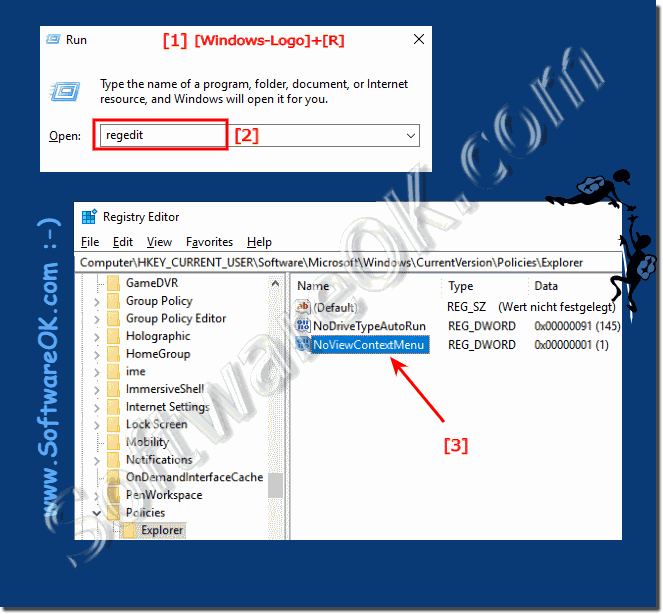
1.Open the registry editor on Windows 11 / 10
 
2: In Registry Editor, navigate to the following key:
 
HKEY_CURRENT_USER\Software\Microsoft\Windows\CurrentVersion\Policies\Explorer

Remove the value:  NoViewContextMenu

Or set to "0" (NULL)

In Windows 11 it is optically a little different but works the same way!

(Image-2) Deactivate the context menu of the desktop and explorer!
Deactivate the context menu of the desktop and explorer!


-
▲ Back to the top ▲


2.) More options for right-click troubleshooting!  


1. Try it with a different mouse if possible 

2. Update the driver via the ►►  device manager

3. If USB sticks are plugged into the PC, notebook, ... pull them out and possibly restart Windows   

4. Plug in the mouse from the USB or PS2 connection from  Windows restart  after restart simply reconnect

5. Try to connect the mouse to another USB port

6. Some PC mice have original drivers that are required, then install them if necessary
 

Many Windows 11 and 10 users have complained that they cannot right-click the desktop or that nothing happens when they right-click the desktop. The solution was simple, an incorrectly restarted Windows  did not solve the problem. If the problem with the right mouse button on the desktop persists.

►►► turn off tablet mode !


Updated on: 21 September 2023 18:44 Windows
Keywords: desktop, windows, 11, 10, cannot, right-click, when, rare, case, occurs, that, right-clicked, many, users, q-dir, report, this, phenomenon, even


Similar information on the page

Windows

... How to find desktop folders from all users on Windows 11 / 10?


Whenever I install a new application, a shortcut for that application is placed on each desktop. With this solution you save time when multiple users are
Windows

... Windows 10 / 11 desktop is gone, what can I do?


This problem occurs not only at large auto-update when the Windows 10 / 11 updates, desktop way No reason to panic The solution ergo instruction is written
Windows

... Go directly to Defender settings via Windows 11 or 10 Desktop


Using a desktop shortcut is easier and faster to open the Defender settings under Windows 11 and 10 You can open the defender settings via the To-Tray icon,
Windows

... Creating a Security Center Shortcut on the Windows 11 or 10 Desktop


You can easily create a security center shortcut on the Windows 11 and 10 desktop for Windows security   Windows 10 offers the latest virus protection with
Windows

... Help the desktop icons are gone on Windows 11 or 10


The emergency help is easy when the desktop icons have disappeared on Windows 11 or 10 and MS Server Everyone probably knows how to activate the desktop,
Windows

... Problems with Remote Desktop under MS Windows 11, 10, ...


Problems with Remote Desktop under MS Windows 11, 10, 8.1, or MS Server 2019, 2016, are very rare Here are the tips for troubleshooting Content:
Windows

... Change desktop background when Windows 11 or 10 is not activated?


Change the Windows-12-11-10 desktop wallpaper even without activation, its really really easy Once Windows 10 is installed but Windows 11/10 is not activated


▲ Back to the top ▲


11 # APPs # Beginner # Desktop # Download # Explorer # File-System # Folder # Hardware # Install # Internet # Media # Monitor # Network # Office # Power-Options # Printer # Quick-Tip # Registry # Search # Security # Settings # Shortcuts # Software # Sound # Store # System # Tips # Update # User #


Questions for this:
  1. Right mouse button doesn't work on desktop?
  2. How to fix a non-functional right click on the desktop in Windows 10 and Windows 11, the question is that the problem exists in Windows 10 and Windows 11 since today and non-functioning right click is quite annoying!
  3. Activate right mouse button?
  4. Right mouse button not working?
  5. Right-click desktop not possible?
  6. Win 10 and Windows 11 right mouse button does not work desktop?
  7. Windows 10 and Windows 11 right mouse button enable?
  8. Right mouse button not working in Windows 10?
  9. Right mouse windows not finked?
  10. Right click not possible?
  11. Mousepad right mouse button not working?
  12. Right mouse button on desktop doesn't work?
  13. Windows 10 and Windows 11 right mouse button lock?
  14. Right-clicking on the mouse no longer works?
  15. Function command right mouse button?
  16. Right click emit windows?
  17. Make the desktop right bar bigger?
  18. Windows 10 right mouse button on windows?
  19. Right mouse button doesn't work on win 10 and Windows 11 desktop?
  20. Right click save as not possible?
  21. Windows 10 and Windows 11 right mouse button desktop sparks?
  22. Win 10 open control panel with right mouse button?
  23. Mouse right button off?
  24. Right mouse button desktop no function?
  25. Right mouse click on desktop doesn't work?
  26. Desktop right mouse button doesn't work?
  27. Activate right mouse click?
  28. Microsoft windows 10 left mouse button not working?
  29. Surface right-click doesn't work?
  30. Windows 10 and Windows 11 desktop right mouse button?
  31. No right-click taskbar?
  32. Right click activate windows?
  33. Windows desktop right-click doesn't work?
  34. Activate right mouse button windows 10 and Windows 11?
  35. I have a problem with my mouse button recently, whenever I right-click on the desktop, does the context menu not appear?
  36. Right mouse button doesn't work?
  37. Problems with right mouse windows 10 and Windows 11?
  38. Troubleshooting windows 10 which rights?
  39. Right click on the taskbar?
  40. Desktop right-click not possible?
  41. Activate Win 10 right mouse button?
  42. Disable the context menu of desktop and explorer?
  43. Windows 10 no link to desktop possible?
  44. Mouse right mouse button no longer responds in Windows?
  45. Mouse right button doesn't work?
  46. Turn off the desktop and explorer context menu?
  47. I can't view with right mouse button on windows10 and Windows 11?
  48. Right mouse taste doesn't work?
  49. With right mouse button access to desktop does not work?
  50. Right mouse button note?
  51. Activate right mouse button in Windows 10?
  52. Windows right mouse button doesn't work?
  53. Right mouse explorer doesn't work?
  54. How can I pin tabs if the right mouse button doesn't work?
  55. Right mouse button doesn't work on start button?
  56. Win 10 right mouse click on folder?


  + Freeware
  + Order on the PC
  + File management
  + Automation
  + Office Tools
  + PC testing tools
  + Decoration and fun
  + Desktop-Clocks
  + Security

  + SoftwareOK Pages
  + Micro Staff
  + Freeware-1
  + Freeware-2
  + Freeware-3
  + FAQ
  + Downloads

  + Top
  + Desktop-OK
  + The Quad Explorer
  + Don't Sleep
  + Win-Scan-2-PDF
  + Quick-Text-Past
  + Print Folder Tree
  + Find Same Images
  + Experience-Index-OK
  + Font-View-OK


  + Freeware
  + Film.Strip.Explorer
  + WinScan2PDF
  + DontSleep
  + ExperienceIndexOK
  + QuickTextPaste
  + DesktopNoteOK
  + ShortDoorNote
  + AutoHideDesktopIcons
  + BlankAndSecure
  + PAD-s


Home | Thanks | Contact | Link me | FAQ | Settings | Windows 10 | gc24b | English-AV | Impressum | Translate | PayPal | PAD-s

 © 2026 by Nenad Hrg ERR2: softwareok.de • softwareok.com • softwareok.com • softwareok.eu
56.292 msec.


>> ☕ Buy SoftwareOK a Coffee ☕ <<


► Printer is suddenly gone under Windows 10 and 11 , why? ◄
► Improve desktop, place second monitor correctly under Windows 10/11! ◄
► Explorer download folder view turn off grouping on Windows 10/11! ◄
► How do I open other file types, not only text files (* .txt) with Notepad? ◄


This website does not store personal data. However, third-party providers are used to display ads,
which are managed by Google and comply with the IAB Transparency and Consent Framework (IAB-TCF).
The CMP ID is 300 and can be individually customized at the bottom of the page.
more Infos & Privacy Policy

....