Software-OK
≡... News | ... Home | ... FAQ | Impressum | Contact | Listed at | Thank you |

  
HOME ► Windows Tip - DesktopOK ► «««« 11 / 16 »»»»

Tools - Tray Features - Screenshot Tool Info!


The solution Tools - Tray Features - Screenshot info Bug report from User of DesktopOK for Windows!


User Request:

Good day, I found a bug in DesktopOK 7.81, and fixed it:
When "" is turned OFF, the following entry in the ".ini" file is NOT reset:
use_screen_shot_feature=1
OS:  Win 10 64-bit
Infos: DesktopOK for MS Windows OS!

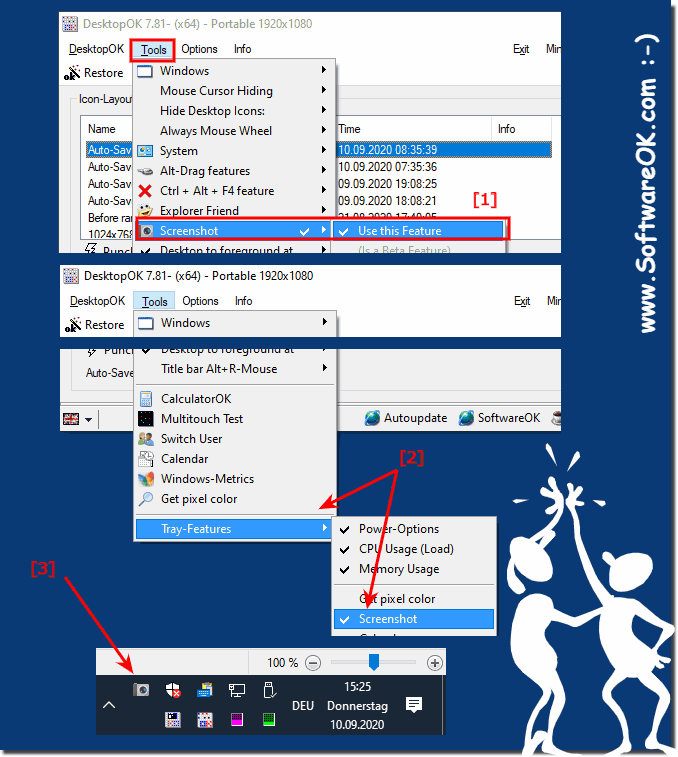
These are two separate entries for the screenshot function

1. To use the Screenshot Tool

2. For the screenshot tool to appear in the notification area of the Windows taskbar!

(... see Image-1 Point 1 and 2)

[DesktopOK]
use_screen_shot_feature=1
screen_shot_in_tray=0

(Image-1) Tools - Tray Features - Screenshot info!
Tools - Tray Features - Screenshot info!

-
▲ Back to the top ▲


Updated on: 23 December 2020 11:50 Windows
Keywords: desktopok, tools, tray, features, screenshot, tool, info, solution, report, from, user, windows, request, good, found


Similar information on the page

Windows

... Many more Windows tools and features in desktop OK


There are many more Windows tools and features hidden in Desktop OK that make working on Windows easier You can use these helpful features not only on Windows
Windows

... DesktopOK Tools + functions for all Windows OS Desktops


DesktopOK likes to be reduced to an Icon Save Tool, but also has many more features that are far useful on Microsoft Windows 11, 10, etc. Desktop and
Windows

... Minimize Thunderbird in tray notification area example


The solution is simple to Minimize Thunderbird or all the other Windows Programs to tray in the notification area on all Windows OS with DesktopOK
Windows

... From-Tray feature to get a Windows Desktop Color


Example how to activate the simple feature to Get a Windows Desktop Color about to tray ergo notification area in the Windows Task Bar
Windows

... Quick, how to use the Screenshot Function in Desktop OK


The screenshot feature for Windows 10, 11, etc. in Desktop OK is an optional feature for desktop screenshots The screenshot function can be optionally
Windows

... Tray function to see the Windows 11, 10, ... CPU and Memory usage


An example of activating the simple function to see CPU, memory usage in the TO-TRAY, ergo notification area in the Windows taskbar Contents: 1. CPU
Windows

... Read almost all the texts, e.g. from Edit-, List-, Tree-View, Groupbox, ...


The GetWindowText command can be used to read window titles and/or content under Windows. Info: This command can be used on all Windows operating systems


▲ Back to the top ▲


See also : ... DesktopOK FAQ
Back to : ... DesktopOK Homeage

... DesktopOK Tip


3D.Benchmark.OK # AlwaysMouseWheel # AutoHideDesktopIcons # AutoPowerOptionsOK # ClassicDesktopClock # DesktopDigitalClock # DesktopNoteOK # DesktopOK # DontSleep # Edge-Chromium # ExperienceIndexOK # Find.Same.Images.OK # FontViewOK # GetPixelColor # GetWindowText # Internet # IsMyHdOK # KeepMouseSpeedOK # NewFileTime # OpenCloseDriveEject # OpenGL # PhotoResizerOK # Q-Dir # QuickMemoryTestOK # QuickTextPaste # Registry # ShortDoorNote # StressMyPC # System # TheAeroClock # Tools # Version # WinScan2PDF #


  + Freeware
  + Order on the PC
  + File management
  + Automation
  + Office Tools
  + PC testing tools
  + Decoration and fun
  + Desktop-Clocks
  + Security

  + SoftwareOK Pages
  + Micro Staff
  + Freeware-1
  + Freeware-2
  + Freeware-3
  + FAQ
  + Downloads

  + Top
  + Desktop-OK
  + The Quad Explorer
  + Don't Sleep
  + Win-Scan-2-PDF
  + Quick-Text-Past
  + Print Folder Tree
  + Find Same Images
  + Experience-Index-OK
  + Font-View-OK


  + Freeware
  + OneLoupe
  + TraceRouteOK
  + GetWindowText
  + AutoHideMouseCursor
  + Desktop.Calendar.Tray.OK
  + OK.Its.Raining.Men
  + Run-Command
  + MagicMouseTrails
  + CpuFrequenz
  + PAD-s


Home | Thanks | Contact | Link me | FAQ | Settings | Windows 10 | gc24b | English-AV | Impressum | Translate | PayPal | PAD-s

 © 2026 by Nenad Hrg ERR2: softwareok.de • softwareok.com • softwareok.com • softwareok.eu
61.115 msec.


>> ☕ Buy SoftwareOK a Coffee ☕ <<


► Fast landscape, portrait or landscape conversion and Preview switch! ◄
► Search for a lock screen preventer is not necessary! ◄
► The Windows 11 wallpapers? ◄
► Create a new scan profile in order not to repeat settings! ◄


This website does not store personal data. However, third-party providers are used to display ads,
which are managed by Google and comply with the IAB Transparency and Consent Framework (IAB-TCF).
The CMP ID is 300 and can be individually customized at the bottom of the page.
more Infos & Privacy Policy

....