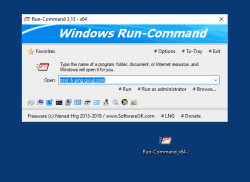
替代標準Windows運行對話框。


通過收藏夾命令運行程序。以管理員身份運行命令 支持Windows環境變量。自定義鍵盤快捷鍵


HOME ► Micro-Staff ► Run-Command 6.33
About History Eula Images FAQ Download (220 KB) de DE en COM en EU
Update on: 18 December 2025
Suitable for : Windows 11, Windows 10, 8.1, 7, ... , Server 2012-2025, 2022, x64, x32, x86
-
Alternative to standard Windows Run-Dialog
... Download (220 KB)
... Extra Info
... FAQ


String List Run-Command: Traditional Chinese  


##=Traditional Chinese   香港繁體中文

TranslatorName=Danfong Hsieh

... Switch to Traditional Chinese - 香港繁體中文


2=授權
3=我接受合約
4=我不接受合約
5=首次啟動! 請接受「使用者授權合約」!!!
6=取消
7=結束(&x)

20=喜好設定
21=開機時啟動
25=停用

26=選項
27=關閉時縮至系統匣 Alt+F4
28=啟動後縮至系統匣
29=啟動後隱藏
30=縮至系統匣
31=最上層顯示
32=關閉時隱藏
33=隱藏

34=執行下列命令時隱藏:
35=命令
36=我的最愛命令

37=深色佈景主題

40=捐贈

44=開啟
45=程式
47=縮至系統匣


50=隱藏資訊
51=執行可執行檔讓程式可見
52=或使用快速鍵:
53=輸入程式、資料夾、文件或網際網路資源名稱,Windows 將幫您開啟它。

54=執行
55=以系統管理員身分執行

56=按下 [Delete] 鍵刪除所選下拉式方塊項目或按 [+] 鍵加入到我的最愛
57=我的最愛(&F)
58=加入到我的最愛

59=功能表標籤
60=確定
61=管理我的最愛
62=瀏覽...

63=新增資料夾
64=空

65=取消
66=確定
67=結束
68=快速鍵

69=左 Window 鍵
70=右 Window 鍵
71=Ctrl + Alt
72=Alt-Gr

73=可執行檔

80=控制台(&C)
81=控制台選單

82=匯出
83=匯入

84=資訊
85=重要: 請在 x64 作業系統中使用 x64 版本的程式!


[Program Info]
90=程式資訊
91=按住 CTRL 鍵將會以系統管理員模式執行文字方塊中、我的最愛和工作列的命令。
92=透過拖放來管理我的最愛
93=要將視窗帶到前景,請使用預先定義快速鍵,您可以透過選項(快速鍵)定義快速鍵。

100=命令

[Passive - Uninstall - 2021]
201=卸載
202=自動更新
203=您確定嗎?
204=將程式重新啟動


* Alternative to the Windows 11, 10, ... and MS Server Run-Dialog + extra features!


About History Eula Images FAQ Download (220 KB) de DE en COM en EU
# Images+ # Info+ # Thanks+
Windows


  + Freeware
  + Order on the PC
  + File management
  + Automation
  + Office Tools
  + PC testing tools
  + Decoration and fun
  + Desktop-Clocks
  + Security

  + SoftwareOK Pages
  + Micro Staff
  + Freeware-1
  + Freeware-2
  + Freeware-3
  + FAQ
  + Downloads


  + Freeware
  + TheAeroClock
  + Bitte.Wenden
  + CoronaKO
  + MatriX.CoronaKO
  + Find.Same.Images.OK
  + 3D.Benchmark.OK
  + PhotoResizerOK
  + Office.Files.Images
  + Film.Strip.Explorer
  + PAD-s


Home | Thanks | Contact | Link me | FAQ | Settings | Windows 10 | gc24b | English-AV | Impressum | Translate | PayPal | PAD-s

 © 2026 by Nenad Hrg softwareok.de • softwareok.com • softwareok.com • softwareok.eu
42.579 msec.


>> ☕ Buy SoftwareOK a Coffee ☕ <<


► Activate / deactivate additional Windows features in Windows-11, -12! ◄
► Can I force shutdown on Windows 11? ◄
► Insert texts and execute commands as administrator and standard user! ◄
► Can I partition / format hard drives under Windows 11? ◄


This website does not store personal data. However, third-party providers are used to display ads,
which are managed by Google and comply with the IAB Transparency and Consent Framework (IAB-TCF).
The CMP ID is 300 and can be individually customized at the bottom of the page.
more Infos & Privacy Policy

....