Software-OK
≡... News | ... Home | ... FAQ | Impressum | Contact | Listed at | Thank you |

  
HOME ► Windows Tip - KeepMouseSpeedOK ► «««« 01 / 01 »»»»

Uninstall the Mouse Speed keeper on Windows 10, 8.1, 7!


To uninstall the Keep Mouse Speed OK for Windows, the Mouse Speed Keeper for Windows 10, 8.1, 7!?


Please Download Keep Mouse Speed OK and start it for example from Windows 10 Desktop, The software is suitable for all Windows OS, x64 and x32, The Keep Mouse Speed OK is free for Commercial, Office and Business, 

to Uninstall the Keep Mouse Speed OK 


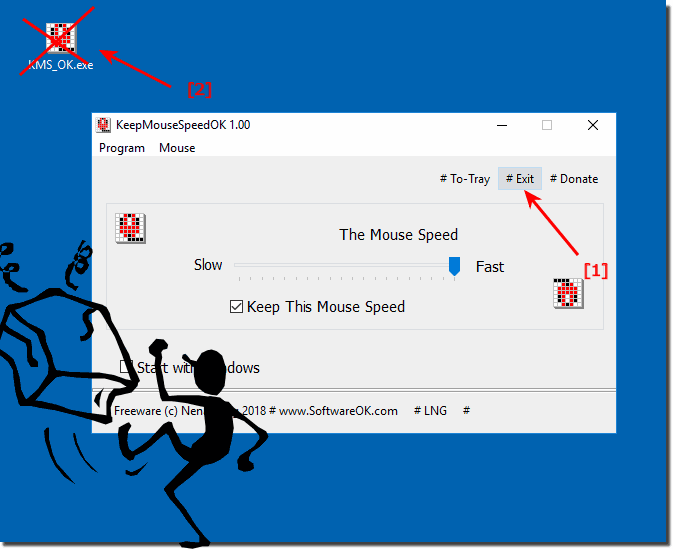
Please exit the Program Menu ► "Exit" 
 
and Delete KMS_OK.exe 

(... see Image-1)


(Image-1) Uninstall KeepMouseSpeedOK from Windows!
Uninstall KeepMouseSpeedOK from Windows!

-
▲ Back to the top ▲


Updated on: 24 August 2019 06:53 Windows
Keywords: keepmousespeedok, uninstall, mouse, speed, keeper, windows, keep, please, download, start


Similar information on the page

Windows

... Installing a printer with own drivers, using HP as an example under Win 11, 10, 8.1, 7


Its easy to install printers with my own drivers, for example HP on Windows 11, 10, 8.1, 7, Server 2016, 2012, Start the command "shell:PrintersFolder"
Windows

... After updating Win-10/11 no space on the disk, what now?


After one of the big auto-updates of Windows 10 or 11, it can get tight on the hard drive. If you want space freed up by Windows 10 / 11 Auto Updates, you
Windows

... Auto size Virtual Memory in Windows 10?


Virtual Memory in Windows 10, is the the pagefile.sys file you can customize and change the size or location of Win 10 Virtual Memory anytime
Windows

... Windows 10 / 11 desktop is gone, what can I do?


This problem occurs not only at large auto-update when the Windows 10 / 11 updates, desktop way No reason to panic The solution ergo instruction is written
Windows

... Windows 10  / 11 / 12 Adapter Settings Find Network?


It is easy to find adapter settings for Windows under Windows -10 / -11 / -12 to make changes Like Googles smartphone, you can quickly open adapter settings
Windows

... Show Message Box if move files to recycle bin on Windows 11 or 10


If move documents into the "Recycle bin", the solution to Show Message Box if delete files or folders
Windows

... Quick view and preview change Windows 11/10 fast access


Sometimes you need to change Windows 11/10 Quick View, better known as a file preview, to see information about the file and sometimes the preview In each


▲ Back to the top ▲


3D.Benchmark.OK # AlwaysMouseWheel # AutoHideDesktopIcons # AutoPowerOptionsOK # ClassicDesktopClock # DesktopDigitalClock # DesktopNoteOK # DesktopOK # DontSleep # Edge-Chromium # ExperienceIndexOK # Find.Same.Images.OK # FontViewOK # GetPixelColor # GetWindowText # Internet # IsMyHdOK # KeepMouseSpeedOK # NewFileTime # OpenCloseDriveEject # OpenGL # PhotoResizerOK # Q-Dir # QuickMemoryTestOK # QuickTextPaste # Registry # ShortDoorNote # StressMyPC # System # TheAeroClock # Tools # Version # WinScan2PDF #


  + Freeware
  + Order on the PC
  + File management
  + Automation
  + Office Tools
  + PC testing tools
  + Decoration and fun
  + Desktop-Clocks
  + Security

  + SoftwareOK Pages
  + Micro Staff
  + Freeware-1
  + Freeware-2
  + Freeware-3
  + FAQ
  + Downloads

  + Top
  + Desktop-OK
  + The Quad Explorer
  + Don't Sleep
  + Win-Scan-2-PDF
  + Quick-Text-Past
  + Print Folder Tree
  + Find Same Images
  + Experience-Index-OK
  + Font-View-OK


  + Freeware
  + NonCompressibleFiles
  + 4ur-Windows-8-Mouse-Balls
  + 12-Ants
  + Q-Dir
  + DirPrintOK
  + FontViewOK
  + MeinPlatz
  + DesktopOK
  + IsMyMemoryOK
  + PAD-s


Home | Thanks | Contact | Link me | FAQ | Settings | Windows 10 | gc24b | English-AV | Impressum | Translate | PayPal | PAD-s

 © 2026 by Nenad Hrg ERR2: softwareok.de • softwareok.com • softwareok.com • softwareok.eu
50.711 msec.


>> ☕ Buy SoftwareOK a Coffee ☕ <<


► TortoiseSVN Overlay Icons and others are supported in Quad Explorer! ◄
► Complete check for Trojans, viruses and ransomware, how to! ◄
► If the network load is low, shut down the PC or put it in standby! ◄
► Favorites in the navigation area of ​​Windows 11 and 10 File Explorer! ◄


This website does not store personal data. However, third-party providers are used to display ads,
which are managed by Google and comply with the IAB Transparency and Consent Framework (IAB-TCF).
The CMP ID is 300 and can be individually customized at the bottom of the page.
more Infos & Privacy Policy

....