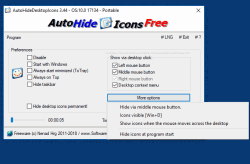
Menyembunyikan ikon desktop, terkawal masa, pada Windows 10, 8.1 dan 7


Menyembunyikan dan menunjukkan simbol desktop secara automatik dan dengan pemasa yang boleh disesuaikan, serta pilihan pengaktifan yang boleh dipilih secara bebas


HOME ► Micro-Staff ► AutoHideDesktopIcons 6.55
About History Eula Images FAQ Download (90 KB) de DE en COM en EU
Update on: 10 October 2025
Suitable for : Windows 11, Windows 10, 8.1, 7, ... , Server 2012-2025, 2022, x64, x32, x86
-
Auto Hide Desktop Icons Portable Win-App.
... Download (90 KB)
... Extra Info
... FAQ


[ :( ]

String List AutoHideDesktopIcons: Malay  


##=Malay   Malaysia

TranslatorName=Washington

... Switch to Malay - Malaysia


20=Keutamaan
21=Mulakan dengan Windows
25=Lumpuhkan

26=Pilihan
28=Sentiasa mula diminimumkan (ToTray)
31=Sentiasa berada di Atas
32=Menu konteks desktop

40=Tunjukkan melalui klik desktop:
41=Butang tetikus kiri
42=Butang tetikus tengah
43=Butang tetikus kanan
44=Pemasa:
45=saat.
46=Sembunyikan bar tugas
47=Ke Dulang
48=Tayangan Bar Tugas Tetikus
49=LNG
50=Keluar
51=AutoHideDesktopIcons

52=Ikon kelihatan [Menang + D]
53=Sembunyikan ikon pada permulaan program

54=Sembunyikan melalui butang tetikus tengah.
55=Tunjukkan ikon semasa tetikus bergerak melintasi desktop
56=Lebih banyak pilihan
57=Sembunyikan bar tugas apabila ikon bersembunyi

60=Sembunyikan ikon desktop permanen

[Nyahpasang]
202=Nyahpasang
212=Lesen (EULA)
222=Kesalahan akses fail
223=Adakah anda pasti?
224=Padamkan fail pelaksanaan #AP#. exe

[DIV]
240=#AP# tip untuk U!
241=Helo,\r\n\r\nSaya menjumpai #AP#.\r\n\r\n.....................................\r\n\ laman web r\n: #IN#\r\nmuat turun: http://www.softwareok.com/?Download=#AP#\r\n

242=Mengesyorkan #AP#
243=Hantar #AP# melalui e-mel
244=Soalan Lazim
245=Sejarah
246=Laman utama
247=Versi terbaru?
248=Sumbang
249=Program


* Auto hide and showing the Windows 11, 10, ... desktop icons with a timer!


About History Eula Images FAQ Download (90 KB) de DE en COM en EU
# Images+ # Info+ # Thanks+
Windows


[ :( ]


  + Freeware
  + Order on the PC
  + File management
  + Automation
  + Office Tools
  + PC testing tools
  + Decoration and fun
  + Desktop-Clocks
  + Security

  + SoftwareOK Pages
  + Micro Staff
  + Freeware-1
  + Freeware-2
  + Freeware-3
  + FAQ
  + Downloads

[ :( ]

  + Freeware
  + Q-Dir
  + DirPrintOK
  + FontViewOK
  + MeinPlatz
  + DesktopOK
  + IsMyMemoryOK
  + StressTheGPU
  + Brightness.Manager.OK
  + PaintOkay
  + PAD-s


Home | Thanks | Contact | Link me | FAQ | Settings | Windows 10 | gc24b | English-AV | Impressum | Translate | PayPal | PAD-s

 © 2025 by Nenad Hrg softwareok.de • softwareok.com • softwareok.com • softwareok.eu
46.045 msec.


>> ☕ Buy SoftwareOK a Coffee ☕ <<


► Difference between hack and break in? ◄
► How do I check the free disk space before a Windows 12 update? ◄
► I can not download the alternative command prompt for windows 11, 10, ... why? ◄
► Pin windows 11 programs to the taskbar? ◄


This website does not store personal data. However, third-party providers are used to display ads,
which are managed by Google and comply with the IAB Transparency and Consent Framework (IAB-TCF).
The CMP ID is 300 and can be individually customized at the bottom of the page.
more Infos & Privacy Policy

....