|
Update on: 20 July 2024
Suitable for : Windows 12 & 11, Windows 10, 8.1, 7, ... , Server 2012-2025, 2022, x64, x32, x86
String List ClassicDesktopClock: English
##=English Englisch
TranslatorName=Nenad Hrg
LastUpdated=13/JAN/2021
[Always on Top +]
10=Forced
11=Only on the desktop
12=With screen saver
13=Random position
14=Always in the foreground
19=Restart clock
20=&Convert
21=&Cancel
22=License
25=Donate
26=Size
27=center of the screen
28=Transparency
29=Fixed at that position
30=Theme
31=Always on Top
32=Start with Windows
33=Second-Hand (Pointer)
34=Show dial
39=Attention
40=Info!
51=To-Tray
52=Exit
53=Disable
54=Exit
56=Color
57=Reset Color
[Theme]
80=Windows
81=Roma
82=Neo
[Tool-Tip]
100=When enabled, the desktop clock stops responding to the mouse and the objects behind it, such as the desktop icons, are accessible.
[Install]
200=Language
201=Install
202=Uninstall
203=Auto Update
204=Desktop shortcut
205=Shortcut in the Start menu
206=Install for all user on this computer
207=Start with Windows
208=Folder
209=Cancel
210=... Change
211=Portable installation
212=... EULA
213=The folder can't be created in the location
214=Run as administrator?
215=An error occurred while creating the
216=You don't have administrative privileges\n#APP# must not be installed, for example, simply copy #APP#_Install.exe to the desktop, rename to #APP#.exe and GO.
217=The "%s" already exists. \n Overwrite existing file?
218=The directory "%s" already exists \n Overwrite directory and existing file?
219=The configuration file (INI) will be not overwritten!
220=Installing as administrator
221=Please close the program
222=File access error
225=Important: Please use the x64 for x64 operating systems!
[DIV]
240=Juhuuuu I found #AP#!
241= Hello,\r\n \r\n I found #AP# . \r\n \r\n .....................................\r\n \r\n website: #IN#\r\n download: http://www.softwareok.com/?Download=#AP#\r\n
242=Recommend #AP#
243=Send #AP# via e-mail
244=FAQ
245=History
246=Homepage
247=Auto Update
[INFO]
180=Info
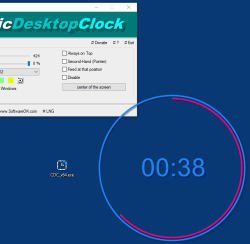
181=Classic Desktop Clock is a simple, but also at the same time beautiful table clock with different themes with individual customization.
182=It's really a decorative Desktop Clocke that uses Vector to show the local time on the desktop.
187=ClassicDesktopClock.exe Command-Line Options:
188=-bg (Start To-Tray)
189=hide (Start Hidden)
190=-ini://path-toini/xxx.ini
191=More info in FAQ via #? button?
* Classic desktop clock for Microsoft 11, 10, ... Windows OS with various settings!
# Images+ # Thanks+
|
 DE
DE COM
COM