
The "ms-settings:privacy-phonecalls" URI in Windows 10 und 11 leads to the phone call privacy settings.
This feature allows users to control which apps have access to their phone calls, including permission to read call data, make calls, or receive notifications about calls. Managing these settings is important to ensure that only authorized apps and services have access to call data.
1. ms-settings:privacy-phonecalls
2. Availability under Windows
3. Other useful commands in the Windows settings
1. The Command ms-settings:privacy-phonecalls
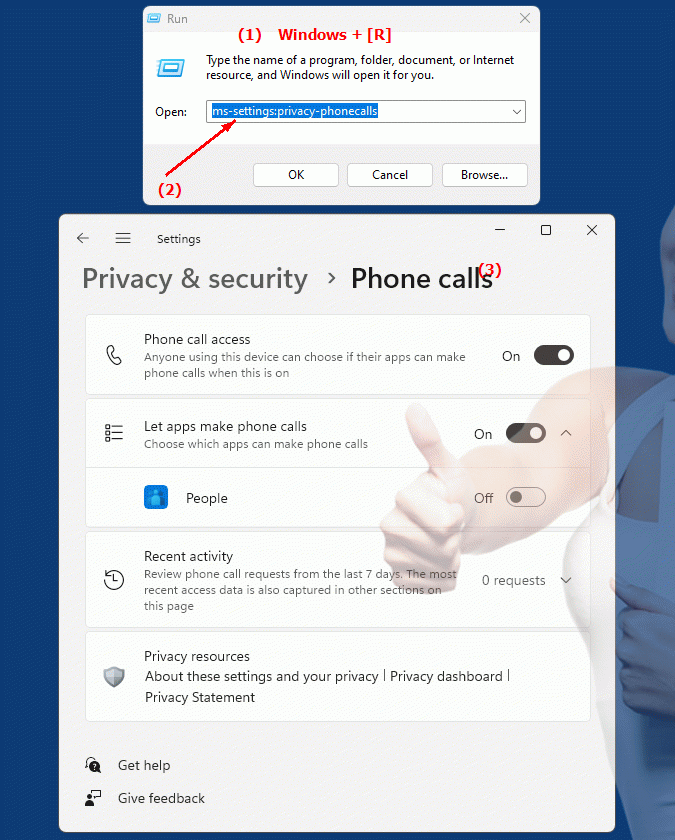
1. Press Windows R to open the input field.2. Enter the command ms-settings:privacy-phonecalls to continue.
(Additionally, use the command for a desktop shortcut.)
3. Click OK or press [Enter] to complete the operation.
(... see Image-1 Point 1 to 3)
You can now use the settings described above in your Windows 10, 11 or 12.
This can solve the following questions and difficulties.
1b. This can solve the following questions and difficulties.
How do I change the settings for accessing my phone calls in Windows?What steps are required to manage permissions for applications that access my phone calls?
Can you show me how to restrict or allow apps to access my phone calls in Windows?
How to configure permissions for applications that are allowed to access phone call data?
In Windows, where can I find the settings to manage apps' access to my phone calls?
Can you provide step-by-step instructions to manage phone call access permissions?
How can I ensure that only authorized apps can access my phone call data?
In which area of ??Windows Settings can you change the permissions for applications that are allowed to access phone calls?
Can you explain why it is important to review phone call access permissions and restrict them if necessary?
How to get an overview of the permissions used by apps to access phone calls?
2. Availability in Windows 10, 11 and 12 and the corresponding build numbers.
Availability in Windows versions
1.Windows10:
- Availability:
The "ms-settings:privacy-phonecalls" URI is not available in Windows 10. Windows 10 does not provide specific privacy settings for phone calls made through this URI. Managing permissions for phone calls is not as granular in Windows 10 as in later versions.
- Build Number:
Since this URI is not available in Windows 10, there is no specific build number that supports this feature.
2.Windows11:
- Availability:
In Windows 11, the URI "ms-settings:privacy-phonecalls" is available. Windows 11 has improved privacy settings and allows more granular management of phone call access by apps. This feature allows users to control access to their call data and manage specific permissions for apps.
- Build number:
The URI is available starting with Windows 11 build 22000 and later. This build number includes the initial release of Windows 11 and all subsequent builds that support this privacy setting.
3.Windows12:
- Availability:
With Windows 12, expected to be released in 2024, the "ms-settings:privacy-phonecalls" URI is expected to continue to be available. Windows 12 is expected to retain existing functionality for managing phone call access and may offer additional options to enhance privacy settings.
- Build Number:
The exact build number for Windows 12 is not determined at the time of release, but the URI is expected to be supported starting with the first released build number of Windows 12.
Summary
The URI "ms-settings:privacy-phonecalls" provides direct access to phone call privacy settings. It is available in Windows 11 starting from build 22000 and above. In Windows 10, this URI is not available, and the feature is expected to be available in Windows 12 as well once the first build number of Windows 12 is released.