|
Update on: 20 July 2024
Suitable for : Windows 12 & 11, Windows 10, 8.1, 7, ... , Server 2012-2025, 2022, x64, x32, x86
String List ClassicDesktopClock: Portuguese-Brazilian
##=Portuguese-Brazilian Português-Brasileiro
TranslatorName=Roland Frantz Celtan
Version=ClassicDesktopClock 4.12
LastUpdated=01/JAN/2023
[Always on Top +]
10=Forçar
11=Somente no desktop
12=Com protetor de tela
13=Posição aleatória
14=Sempre ao fundo
19=Reiniciar o relógio
20=&Converter
21=&Cancelar
22=Licença
25=Doar
26=Tammanho
27=centralizar
28=Transparencia
29=Fixar na posição
30=Tema
31=Sempre no topo
32=Iniciar com o Windows
33=Ponteiro dos Segundos
39=Atenção
40=Info!
51=Para Bandeja
52=Sair
53=Desabilitar
54=Sair
56=Cor
57=Resetar Cor
[Theme]
80=Windows
81=Romano
82=Neo
[Tool-Tip]
100=When enabled, the desktop clock stops responding to the mouse and the objects behind it, such as the desktop icons, are accessible.
[Install]
200=Idioma
201=Instalar
202=Desinstalar
203=Auto Atualizar
204=Atalho para o Desktop
205=Atalho para o menu iniciar
206=Instalar para todos os usuários
207=Iniciar com o Windows
208=Pasta
209=Cancelar
210=... Trocar
211=Instalação portátil
212=... EULA
213=A pasta não pode ser criada neste local
214=Executar como administrador?
215=Um erro ocorreu durante a criação do
216=Você não tem privilégio de administrador\n#APP# não deve ser instalado, por exemplo, simplesmente copie #APP#_Install.exe para a área de trabalho, renomeie para #APP#.exe.
217=O "%s" já existe. \n Regravar o arquivo?
218=O diretório "%s" já existe \n Regravar o diretório e o arquivo existente?
219=O arquivo de configuração (INI) será regravado!
220=Instalar como administrador
221=Por gentileza feche o programa
222=Erro de acesso ao arquivo
225=Important: Please use the x64 for x64 operating systems!
[DIV]
240=Juhuuuu I found #AP#!
241= Hello,\r\n \r\n I found #AP# . \r\n \r\n .....................................\r\n \r\n website: #IN#\r\n download: http://www.softwareok.com/?Download=#AP#\r\n
242=Recomendar #AP#
243=Enviar #AP# via e-mail
244=FAQ
245=Histórico
246=Homepage
247=Auto Atualizare
[INFO]
180=Info
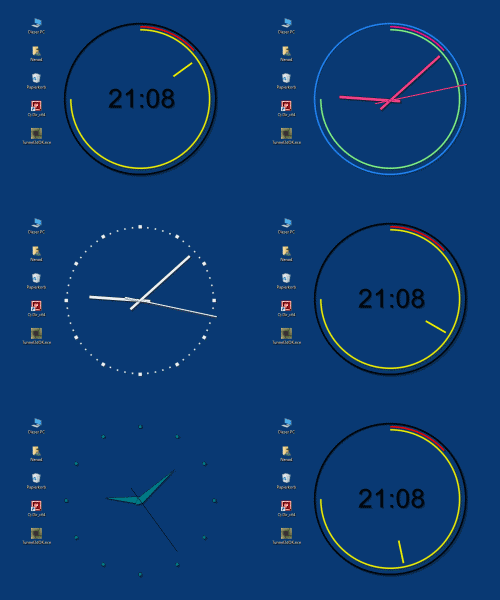
181=Classic Desktop Clock is a simple, but also at the same time beautiful table clock with different themes with individual customization.
182=It's really a decorative Desktop Clocke that uses Vector to show the local time on the desktop.
187=ClassicDesktopClock.exe Command-Line Options:
188=-bg (Start To-Tray)
189=hide (Start Hidden)
190=-ini://path-toini/xxx.ini
191=More info in FAQ via #? button?
* Classic desktop clock for Microsoft 11, 10, ... Windows OS with various settings!
# Images+ # Thanks+
|
 DE
DE COM
COM