Software-OK
≡... News | ... Home | ... FAQ | Impressum | Contact | Listed at | Thank you |

  
HOME ► Faq ► FAQ - WinPing ► ««« FAQ 02 / 04 »»»

Can I also use WinPing in my home network on Windows 11, 10, etc.?


Yes, WinPing can also be used in the home network, even if, for example, the connection is made via the Fritz-Box or Speed-Port!


Contents:

1.) ... Example connection test to google.de with Fritz-Box as router!
2.) ... How meaningful are ping measurements and what can I find out from them?

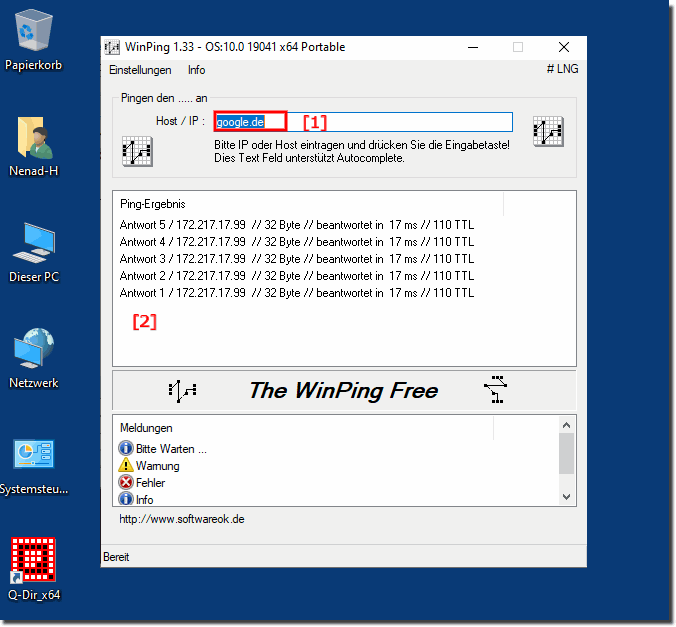
1.) Example connection test to google.de with Fritz-Box as router!

Example connection test to google.de with Fritz-Box as router! 
( ... see Image-1 )

PS:

Please use  ... always the latest version of WinPing!  With the ping test, it does not matter whether you are in the company network or directly connected to the Internet. In order to detect possible network errors or problems you can use the tool  TraceRouteOK, with this all nodes are tested when the connection is established!


See also: ►►  Why and for what purpose trace route for MS Windows OS?


(Image-1) Use WinPing in your home network!
Use WinPing in your home network!


-
▲ Back to the top ▲


2.) How meaningful are ping measurements and what can I learn from them?


Ping measurements are a useful tool for checking network connectivity and diagnosing problems. Here are some important aspects that describe the value of ping measurements and what they can tell you:

Significance of ping measurements:


1. Reachability:

- Ping measurements show whether a specific destination (such as a server or other network device) is reachable. If the packets are sent and received successfully, the destination is reachable.

2. Latency (Round-Trip Time, RTT):

- The measured time it takes for a packet to get to the destination and back indicates the latency of the connection. Low values ​​indicate a fast connection, while high values ​​indicate delays.

3. Packet Loss:

- If packets are lost on the way to the destination or back, this indicates possible network problems such as congestion, hardware failure or poor connections.

4. Jitter:

- The fluctuations in latency times (jitter) can indicate instabilities in the network. High jitter can be particularly problematic for time-critical applications such as VoIP or video conferencing.

What can be detected by ping measurements?


1. Network availability:

- You can determine if certain network devices or servers are online and available.

2. Network speed:

- Measuring latency can help you understand the speed and quality of the network connection.

3. Network congestion:

- High latency and packet loss can indicate network congestion.

4. Misconfigurations:

- Reachability issues or unusual ping results can indicate misconfigurations in your network.

5. Network paths:

- Advanced tools like traceroute can help you trace the route your data packets take through the network and determine exactly where delays or packet loss are occurring.

Limitations of ping measurements:


1. ICMP filtering:

- Some firewalls or routers block ICMP packets (used by Ping), which can lead to incorrect results.

2. Different paths:

- Data packets can travel through the network in different ways, which can lead to inconsistent results.

3. Limited diagnostics:

- Ping provides limited information and should be used in conjunction with other network tests (such as traceroute, MTR, etc.) to get a complete picture of network health.

Ping measurements are a basic and useful tool for initially diagnosing network problems, but they should be complemented by other methods to gain comprehensive insight into network performance and stability.

FAQ 2: Updated on: 26 May 2024 05:53 Windows


► ► ► ► ... more information about the software WinPing     

WinPing

Uninstall WinPing and portable use on Windows Desktops and Server OS!


The solution is very simple to uninstall WinPing or remove it from the operating system Simply delete WinPing.exe and WinPing.ini from the operating system
WinPing

Can I still use the ping command under Windows 11?


Yes and it is very easy to use this little ping tool on all MS Windows 11 OS to execute ping commands Contents: 1. Simple example with WinPing on MS
WinPing

Uninstall WinPing and portable use on Windows Desktops and Server OS!


The solution is very simple to uninstall WinPing or remove it from the operating system Simply delete WinPing.exe and WinPing.ini from the operating system
WinPing

Can I also use WinPing in my home network on Windows 11, 10, etc.?


Yes, WinPing can also be used in the home network, even if, for example, the connection is made via the Fritz-Box or Speed-Port Contents: 1. Example
WinPing

Can I still use the ping command under Windows 11?


Yes and it is very easy to use this little ping tool on all MS Windows 11 OS to execute ping commands Contents: 1. Simple example with WinPing on MS

»»

  My question is not there in the FAQ
Asked questions on this answer:
  1. How can I automate ping measurements?
  2. How can I use WinPing to determine if my router is working properly?
  3. What is the difference between ping and traceroute?
  4. How often should I perform ping measurements to monitor my network?
  5. How do I use WinPing with a Fritz box?
  6. How do I interpret latency in WinPing?
  7. Why do I get different ping results on different tests?
  8. How can I tell if my internet is slow?
  9. What information does WinPing provide me about my network?
  10. What are common causes of high ping?
  11. Can WinPing help diagnose network errors?
  12. How does WinPing help me troubleshoot my network?
  13. How accurate are WinPing's ping measurements?
  14. What do the results of a ping measurement mean?
  15. What does it mean when WinPing says "Timeout"?
  16. Can I also use WinPing for mobile networks?
  17. What can I do if my ping is too high?
  18. How can I check the stability of my internet connection with WinPing?
  19. Can I use WinPing on my smartphone?
  20. Can I also use WinPing in my home network?
  21. How does WinPing help me optimize my network connection?
  22. Can WinPing detect network congestion?
  23. Why does my ping value fluctuate?
  24. Why is my firewall blocking WinPing?
  25. What alternatives to WinPing are there?
  26. Why does WinPing sometimes show packet loss?
  27. What can I do if WinPing doesn't receive a response?
Keywords: winping, also, home, network, windows, 11, 10, even, example, connection, fritz, box, speed, port, test, Questions, Answers, Software


  + Freeware
  + Order on the PC
  + File management
  + Automation
  + Office Tools
  + PC testing tools
  + Decoration and fun
  + Desktop-Clocks
  + Security

  + SoftwareOK Pages
  + Micro Staff
  + Freeware-1
  + Freeware-2
  + Freeware-3
  + FAQ
  + Downloads

  + Top
  + Desktop-OK
  + The Quad Explorer
  + Don't Sleep
  + Win-Scan-2-PDF
  + Quick-Text-Past
  + Print Folder Tree
  + Find Same Images
  + Experience-Index-OK
  + Font-View-OK


  + Freeware
  + MultiClipBoardSlots
  + OnlyStopWatch
  + KeepMouseSpeedOK
  + NonCompressibleFiles
  + 4ur-Windows-8-Mouse-Balls
  + 12-Ants
  + Q-Dir
  + DirPrintOK
  + FontViewOK
  + PAD-s


Home | Thanks | Contact | Link me | FAQ | Settings | Windows 10 | gc24b | English-AV | Impressum | Translate | PayPal | PAD-s

 © 2025 by Nenad Hrg softwareok.de • softwareok.com • softwareok.com • softwareok.eu
32.488 msec.


>> ☕ Buy SoftwareOK a Coffee ☕ <<


► Windows 10 / 11 Clipboard Open history and use! ◄
► Preview fonts installed in Windows 11 or 10, how does that work? ◄
► Use ms-settings:sound command to set the sound for Windows 10/11! ◄
► Classic address bar under Windows-10, -11, -12  instead of a new address line! ◄


This website does not store personal data. However, third-party providers are used to display ads,
which are managed by Google and comply with the IAB Transparency and Consent Framework (IAB-TCF).
The CMP ID is 300 and can be individually customized at the bottom of the page.
more Infos & Privacy Policy

....