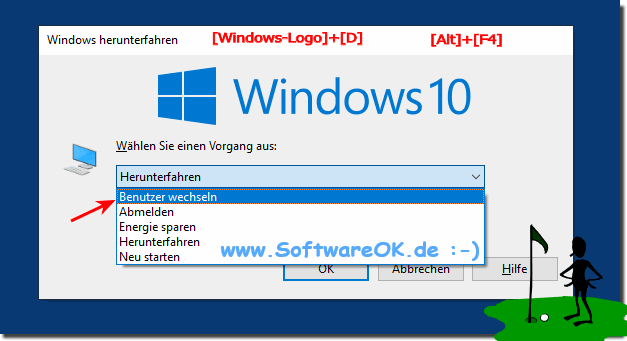
After upgrade, user switching does not show why Windows 10 / 11?
It is rare that after upgrading from Windows 10 / 11 the user switch is no longer displayed!
You can always change the current user under Windows 10. Here, open programs and applications can continue to run in the background , if later changed back to the corresponding user account you can continue to work normally, sometimes better than to completely unsubscribe.
In Windows 10, the big updates, it is not like an update, its almost completely a new operating system The Windows 10 is in reality not Windows 10 plus
Many users are frustrated with Windows 10 and just want to uninstall it and work again on Windows 7 / 8.1 With older computers it can already come with
After an update, the Windows 10 or 11 is getting slower. Here are tips on what you can do to make the operating system faster again Tips for Windows 10?
It may happen that you can not upgrade to the latest major Windows 10 update Its mostly because the Microsoft Windows Server is overloaded, the big updates
A fatal bug in the Spring Creators update that causes the Redston Creators Update to delay, You can skip the auto update Only developers can search for
If at Auto-Update the status: Downloading - 100% hangs under Microsoft Windows 10 This is an undisclosed check by the virus checker, through which Defender,
Can't see user login screen is not showing where I could log in?
Looking for solutions for user switching disappeared on Windows 10 Pro?
Windows 10 after update user change for logout what am I doing wrong!
Windows 10 change user is not displayed?
Do not change user?
Setting Change user is not displayed?
How do you change the Windows 10 user?
Windows 10 user change no longer works?
Windows 10 switch user is not displayed?
Change user is not displayed?
Windows 10 change user without logging off no longer works with current user change, all open programs and windows are closed, we show me how to switch users to Windows instead of logging off completely?
Since the last update, I can no longer switch between Windows 10 users on my computer as usual, but two user accounts have been set up on the computer?
Windows 10 change user not displayed?
Windows 10 user change is not displayed?
Change user windows 10 is not displayed?
Logged in with user but missing the user icon in the start menu?
After update when changing user comes logoff User is completely logged off?
User change is not displayed win 10?
I cannot change the current user in Windows 10 without logging out first?
This website does not store personal data. However, third-party providers are used to display ads, which are managed by Google and comply with the IAB Transparency and Consent Framework (IAB-TCF). The CMP ID is 300 and can be individually customized at the bottom of the page. more Infos & Privacy Policy ....