Software-OK
≡... News | ... Home | ... FAQ | Impressum | Contact | Listed at | Thank you |

  
HOME ► Faq ► FAQ - CpuFrequenz ► ««« FAQ 05 / 08 »»»

I don't always have the same CPU frequency, why?


If the CPU frequency is not always the same, it can have different causes, it does not have to be a faulty / defective CPU! 


Contents:

1.) ... The processor / CPU frequency can definitely vary!
2.) ... Other reasons If the CPU frequency is not always the same!


1.) The processor / CPU frequency can vary!


The processor / CPU frequency can deviate, for example, the latest CPUs have the property of reducing the clock rate when there is a threat of overheating. This leads to a different result when measuring the frequency. It is the same with mobile devices, tablets, MS Surface, laptops, ... these can also reduce the maximum CPU frequency in battery mode in order to save the battery and thus achieve a longer runtime in battery mode! 


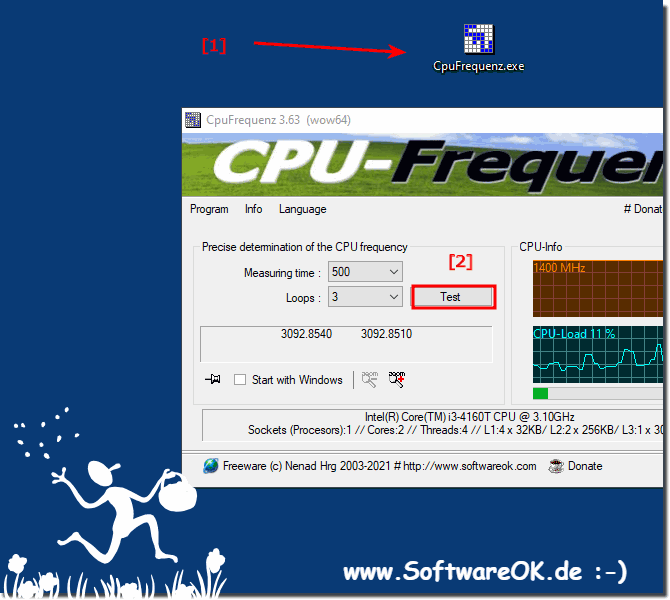
1. As always, start ►►  the CPU frequency query on MS Windows 

2. Repeat the measurement when the device has cooled down
(PS: or, for mobile devices, once in the network and once in battery mode) 

(Image-1) Simply repeat the CPU frequency Test!
Simply repeat the CPU frequency Test!

-
▲ Back to the top ▲


2.) Other reasons If the CPU frequency is not always the same!


CPU frequencies do not remain constant and can vary for a variety of reasons, including:

1. Dynamic Frequency Scaling (DFS) Most modern CPUs support dynamic frequency scaling, also known as CPU throttling or speed stepping. This technology allows the CPU to adjust its clock speed on the fly based on current workload and power management policies. When the CPU is idle or under light load, it can reduce its frequency to save power and reduce heat generation. Conversely, when the workload is high, the frequency can be increased to improve performance.

2. Power managementAs mentioned earlier, power management plays an important role in varying CPU frequency. Lowering the CPU frequency reduces power consumption, which is crucial for laptops and mobile devices to extend battery life. Desktops and servers also use power management to save energy and reduce cooling costs.

3. Temperature Management CPUs generate heat when operated at high frequencies. To avoid overheating, CPUs can dynamically reduce their frequency when the temperature exceeds a certain threshold. This is a security mechanism to protect the CPU from damage.

4. Turbo BoostMany modern CPUs have a feature called Turbo Boost or Turbo Core. This technology allows the CPU to temporarily increase its frequency above the base clock frequency when additional processing power is needed. When the workload requires it, Turbo Boost can provide a performance boost for short periods of time.

5. Hardware and Firmware Settings Some CPUs allow users or system administrators to manually adjust the CPU frequency through BIOS/UEFI settings or software utilities. For example, overclocking is intentionally setting the CPU to run at a higher frequency than the base clock frequency.

6. Operating system controlsThe operating system plays a role in managing CPU frequency through power management policies. It can adjust CPU frequency based on system power profile and user-defined settings. Different performance profiles, such as Options such as Symmetrical or High Performance can affect the behavior of the CPU frequency.

7. Workload Variation CPU frequency may vary depending on the type of workload. Intensive tasks like video rendering or gaming can cause the CPU to run at higher frequencies, while lighter tasks like web browsing can cause the CPU to run at lower frequencies.

8. Thermal limitationsFor laptops and smaller form factor devices, space and cooling limitations can limit CPU clocking under heavy load. The CPU may not be able to maintain its maximum rated frequency for extended periods of time without reaching critical temperatures, so it adjusts its frequency accordingly.


In summary, CPU frequencies vary due to a combination of dynamic frequency scaling, power management, temperature control, workload requirements, and user or system settings. This flexibility allows CPUs to balance performance, power consumption, and thermal considerations to meet the needs of different computing scenarios.


FAQ 5: Updated on: 6 May 2024 18:34 Windows


► ► ► ► ... more information about the software CpuFrequenz     

CpuFrequenz

I'm having problems at installing of the CPU query Tool!


It is quite easy to solve the problems with the installation of the CPU query tool for MS Windows 11, 10, , whether on desktop or server operating systems
CpuFrequenz

Why a frequency query of the CPUs at all?


The Central Processing Unit CPU is considered an essential component in every system, a look at the frequency is not wrong with the CPUs Contents: 1.
CpuFrequenz

Difference between cores and threads on the CPU?


Cores are processors, each has its own circuitry and L1 or L2 cache, which can read and execute instructions separately You probably recognized the cores
CpuFrequenz

CPU frequency in Windows 10 and 11 does not fluctuate, why?


After the various update to eg 1607 the processor does not seem to be down-clocking anymore. For notebook and Surface Pro or GO it is partly connected to
CpuFrequenz

Wrong detection of CPU manufacturers and series i5, i9, why?


From version 2.11 a better recognition of some CPUs and the manufacturer as well as series is available above all with Intel processors This screenshot
CpuFrequenz

How does the exact CPU frequency query work on MS Windows OS?


Good question to understand how the exact CPU frequency query works on MS Windows 11, 10, etc. operating systems Content: 1. The exact CPU frequency

»»

  My question is not there in the FAQ
Asked questions on this answer:
Keywords: cpufrequenz, always, have, same, frequency, different, cpu, faulty, defective, processor, Questions, Answers, Software


  + Freeware
  + Order on the PC
  + File management
  + Automation
  + Office Tools
  + PC testing tools
  + Decoration and fun
  + Desktop-Clocks
  + Security

  + SoftwareOK Pages
  + Micro Staff
  + Freeware-1
  + Freeware-2
  + Freeware-3
  + FAQ
  + Downloads

  + Top
  + Desktop-OK
  + The Quad Explorer
  + Don't Sleep
  + Win-Scan-2-PDF
  + Quick-Text-Past
  + Print Folder Tree
  + Find Same Images
  + Experience-Index-OK
  + Font-View-OK


  + Freeware
  + Bitte.Wenden
  + CoronaKO
  + MatriX.CoronaKO
  + Find.Same.Images.OK
  + 3D.Benchmark.OK
  + PhotoResizerOK
  + Office.Files.Images
  + Film.Strip.Explorer
  + WinScan2PDF
  + PAD-s


Home | Thanks | Contact | Link me | FAQ | Settings | Windows 10 | gc24b | English-AV | Impressum | Translate | PayPal | PAD-s

 © 2026 by Nenad Hrg softwareok.de • softwareok.com • softwareok.com • softwareok.eu
29.151 msec.


>> ☕ Buy SoftwareOK a Coffee ☕ <<


► Filename To Time now also supports Unix time stamps! ◄
► The aero clock with star textures a little USA! ◄
► Quickly restart Quad File Explorer for Windows? ◄
► Tip simple several rename in the File Explorer Views! ◄


This website does not store personal data. However, third-party providers are used to display ads,
which are managed by Google and comply with the IAB Transparency and Consent Framework (IAB-TCF).
The CMP ID is 300 and can be individually customized at the bottom of the page.
more Infos & Privacy Policy

....