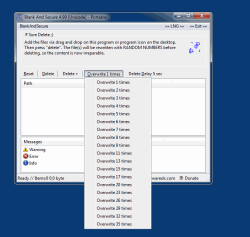
从计算机上的硬盘驱动器中删除标准删除曲目


使用此程序可以安全删除,因为在删除文件之前,此工具会使用随机数覆盖数据


HOME ► Micro-Staff ► BlankAndSecure 8.56
About History Eula Images FAQ Download (163 KB) en EN en DE
Update on: 29 October 2026
Suitable for : Windows 11, Windows 10, 8.1, 7, ... , Server 2012-2025, 2022, x64, x32, x86
-
Portable tool to securely delete the data.
... Download (163 KB)
... Extra Info
... FAQ


String List BlankAndSecure: Simplified-Chinese  


##=Simplified-Chinese   中文(简体)

TranslatorName=Simon_Zhang

... Switch to Simplified-Chinese - 中文(简体)

LastUpdated=10 SEP 2026

0=许可证
1=我接受许可协议
2=我拒绝许可协议
3=首次启动,请接受最终用户许可协议!!!
4=使用随机数填充空闲空间
5=把文件拖到本程序或桌面图标上,然后点击“删除”。删除前会用随机数据覆写文件,内容将无法恢复。
6=开始
7=停止
8=中止 // [ESC]
9=清空列表(&R)
10=将在 %d 秒后开始。按 [ESC] 中止。
11=BlankAndSecure
12=(c) 2009 Nenad Hrg www.SoftwareOK.com
13=路径
14=就绪
15= # 确认删除 ;)
16=旧
17=新
18=错误
19=请在列表中选择一个文件夹/文件
20=预览
21=可用
22=日期
23=时间
24=当前
25=包含子文件夹
26=添加文件
27=添加文件夹
28=退出
29=删除(&D)
30=删除并退出(&X)
31=确定吗?
32=取消
33=项目
34=删除延迟 %d 秒(&D)
35=覆写 %d 次(&O)
36=信息
37=错误
38=警告
39=无法获取目录
40=开始 ...
41=总计
42=分
43=秒
44=剩余
45=已用
46=/
47=路径
48=大小
49=处理信息
50=正在等待写入权限...

51=添加到“发送到”右键菜单
52=从“发送到”右键菜单中移除
53=编辑“发送到”菜单
54=主页
55=常见问题
56=捐赠

57=删除后
58=退出程序
59=关闭计算机
80=计算机待机

60=帮助

61=清空列表:
62=清空列表内容(不会删除文件)。

63=删除:
64=用随机数据覆写文件夹及文件并删除。

65=覆写次数:
66=用随机数据将原有数据覆写 X 次。

67=删除延迟 X 秒:
68=此时按 [ESC] 键可中止擦除过程.

69=用随机数据填充空闲空间:
70=这将清除硬盘上的常规删除痕迹.

81=关机倒计时
82=待机倒计时
83=秒

90=确定
91=取消
92=添加到资源管理器右键菜单

93=卸载
94=配置文件夹
95=允许本程序访问受保护文件夹(Defender)

96=页面始终置顶
97=自动更新


255=结束


* Make data recovery impossible on Windows 11, 10, ... and MS Server OS!


About History Eula Images FAQ Download (163 KB) en EN en DE
# Info+ # Thanks+
Windows


  + Freeware
  + Order on the PC
  + File management
  + Automation
  + Office Tools
  + PC testing tools
  + Decoration and fun
  + Desktop-Clocks
  + Security

  + SoftwareOK Pages
  + Micro Staff
  + Freeware-1
  + Freeware-2
  + Freeware-3
  + FAQ
  + Downloads


  + Freeware
  + 12-Ants
  + Q-Dir
  + DirPrintOK
  + FontViewOK
  + WinScan2PDF
  + TheAeroClock
  + MeinPlatz
  + WinBin2Iso
  + DesktopOK
  + PAD-s


Home | Thanks | Contact | Link me | FAQ | Windows 2024 | Settings | Windows 10 | QF | English-AV | Impressum | Translate | PayPal | PAD-s

 © 2026 by Nenad Hrg softwareok.de • softwareok.com • softwareok.com • softwareok.eu
68.14 msec.


>> ☕ Buy SoftwareOK a Coffee ☕ <<


► Install Apache, known as HTTP Server, on Linux? ◄
► Create calculator keyboard shortcut for all windows OS! ◄
► Starting the scan tool under Windows 11! ◄
► Digital Desktop Clock plus Optional transparency on Windows 11, 10, 8.1, 7! ◄


This website does not store personal data. However, third-party providers are used to display ads,
which are managed by Google and comply with the IAB Transparency and Consent Framework (IAB-TCF).
The CMP ID is 300 and can be individually customized at the bottom of the page.
more Infos & Privacy Policy

....