Software-OK
≡... News | ... Home | ... FAQ | Impressum | Contact | Listed at | Thank you |

  
HOME ► Faq ► FAQ - Windows-11 ► ««« »»»

I was able to install Windows 11 without TPM, why?


You can also install the test versions of Windows 11 without TPM , this will not work with the official release of MS Windows 11!


Info:

Windows 11 cannot be installed on some computers due to higher system requirements. You can currently also create a virtual HD image and then use it, but all these possibilities will not work with the official version of MS Windows 11!


That's an interesting observation 😊 – Microsoft officially requires TPM 2.0, Secure Boot, and certain CPU generations for Windows 11. Nevertheless, it is possible to install Windows 11 without a TPM. This is because the setup checks are not "technically required," but rather artificial hurdles that Microsoft has built into the installer.

There are several reasons why your installation worked without a TPM:


1. Official: Installation workarounds by Microsoft itself
2. Unofficial Methods
3. Microsoft's Strategy


1.) Official: Installation workarounds by Microsoft itself


Microsoft has deliberately left a backdoor:

* If a device has TPM 1.2 (or no TPM at all) and you set a specific registry key (`AllowUpgradesWithUnsupportedTPMOrCPU=1`), the check is skipped during installation.
* The query can also be bypassed using certain installation methods such as in-place upgrade with ISO file or manually creating a boot stick with modified setup files.


2.) Unofficial Methods


Many users use tricks, for example:

* Patch setup files: `appraiserres.dll` is deleted or replaced in the installation media.
* Adjust the registry during setup (e.g., `BypassTPMCheck`, `BypassSecureBootCheck`).
* Third-party tools such as Rufus offer to automatically remove TPM and CPU checks when creating the installation stick.


3.) Microsoft's Strategy


So, Microsoft is not completely preventing the installation from a technical perspective, but rather wants to "deter" users. Devices without TPM 2.0 will get Windows 11, but:

* Microsoft does not guarantee stability, updates, or support.
* Security features like BitLocker, Windows Hello with biometric data, or Device Encryption are limited or not usable at all.


👉 In short:
You were able to install Windows 11 without a TPM because Microsoft only included installation hurdles, but no technical barriers. These can be circumvented with some registry tweaking, installation stick patching, or tools like Rufus – and Microsoft itself has tacitly accepted this backdoor.


I have a 32-bit device. Can I upgrade to Windows 11?


Unfortunately, no! According to MS, many hardware innovations have happened in the PC area since the introduction of Windows 10 six years ago. In order for Windows to move forward and take better advantage of the latest innovations, MS needs to increase the basic system requirements for modern PCs.

See: ►► What is UEFI firmware?   ►► What is a TPM 2.0 chip!  ►► x86 and x32, what is what?


Info (c) Microsoft!

If devices do not meet the new hardware requirements, there may be problems and errors that affect the experience of Windows 11 on these PCs and may not be resolved. All Windows Insiders who have already installed builds from the Dev Channel on their PCs by June 24, 2021 are still allowed to install Windows 11 Insider Preview builds, even if their PC does not meet the minimum hardware requirements.


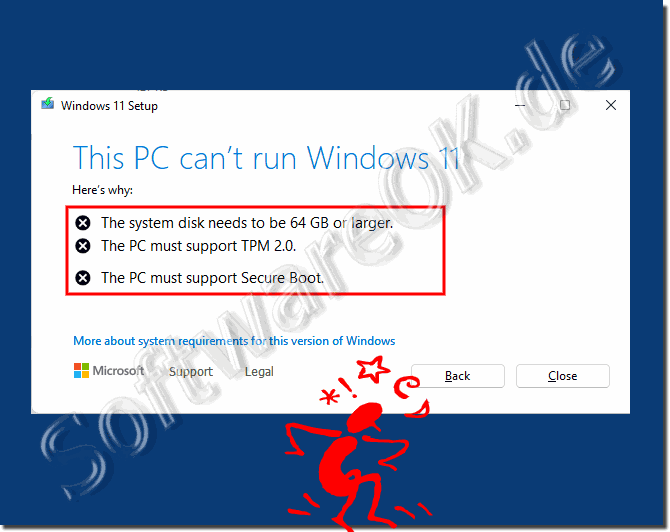
(Image-1) Windows 11 TPM 2.0 Error and Secure Boot!
Windows 11 TPM 2.0 Error and Secure Boot!

-
▲ Back to the top ▲


FAQ 57: Updated on: 22 August 2025 09:46 Windows
Windows-11

What kind of keys can I use to install / activate Windows 11?


Microsoft is quite accommodating when installing Windows 11 to install / activate it, many keys are authorized Contents: 1. Use old keys / product
Windows-11

The system taskbar symbols disappear under Windows 11?


Windows 11 is in the development stage, the disappearance of the taskbar icons is one of the BUGs under Windows 11     1. If icons disappear from the
Windows-11

How to deactivate the Windows 11 startup sound?


Windows 11 is provided with a startup sound by MS, but deactivating it is also quite easy Unlike Windows 10, the MS Windows 11 has a new start sound. This
Windows-11

Will my FireFox also work on Windows 11?


The FireFox Browser also works quite well on Windows 11, there are no differences to Windows 10   Content: 1. FireFox on Windows 11 2. Is FireFox
Windows-11

Where can I find the contrast designs for poor eyesight in Windows 11?


It is quite easy to find and use the contrast designs in Windows 11, which can be an advantage in poor light, for the visually impaired or if you have poor
Windows-11

How to customize the Windows 11 Smart Screen?


The Windows 11 Smart Screen protects against downloads and the installation of malware, but the protection can be deactivated / adjusted 1. Customize
Windows-11

Can I create an Internet shortcut in the Windows 11 start menu?


You can create an Internet shortcut for the desktop in a roundabout way and then place it in the Windows 11 start menu 1. An Internet shortcut on the

»»

  My question is not there in the FAQ
Asked questions on this answer:
Keywords: windows, 11, able, install, without, ZPM, versions, work, official, release, Questions, Answers, Software


  + Freeware
  + Order on the PC
  + File management
  + Automation
  + Office Tools
  + PC testing tools
  + Decoration and fun
  + Desktop-Clocks
  + Security

  + SoftwareOK Pages
  + Micro Staff
  + Freeware-1
  + Freeware-2
  + Freeware-3
  + FAQ
  + Downloads

  + Top
  + Desktop-OK
  + The Quad Explorer
  + Don't Sleep
  + Win-Scan-2-PDF
  + Quick-Text-Past
  + Print Folder Tree
  + Find Same Images
  + Experience-Index-OK
  + Font-View-OK


  + Freeware
  + Print.Test.Page.OK
  + OpenCloseDriveEject
  + ColorConsole
  + IsMyLcdOK
  + DesktopDigitalClock
  + ClassicDesktopClock
  + PreventTurnOff
  + QuickMemoryTestOK
  + IsMyHdOK
  + PAD-s


Home | Thanks | Contact | Link me | FAQ | Settings | Windows 10 | gc24b | English-AV | Impressum | Translate | PayPal | PAD-s

 © 2026 by Nenad Hrg softwareok.de • softwareok.com • softwareok.com • softwareok.eu
31.683 msec.


>> ☕ Buy SoftwareOK a Coffee ☕ <<


► Webp Preview For Windows Explorer, Server 2019, 2022, 2025? ◄
► How to select/add users for Windows 8 / 10 / 11 Remote Desktop connections (allow, disallow, access authorization)? ◄
► How can I stop the computer load test on my Windows PC? ◄
► How do I proceed on a virtual platform machine? ◄


This website does not store personal data. However, third-party providers are used to display ads,
which are managed by Google and comply with the IAB Transparency and Consent Framework (IAB-TCF).
The CMP ID is 300 and can be individually customized at the bottom of the page.
more Infos & Privacy Policy

....