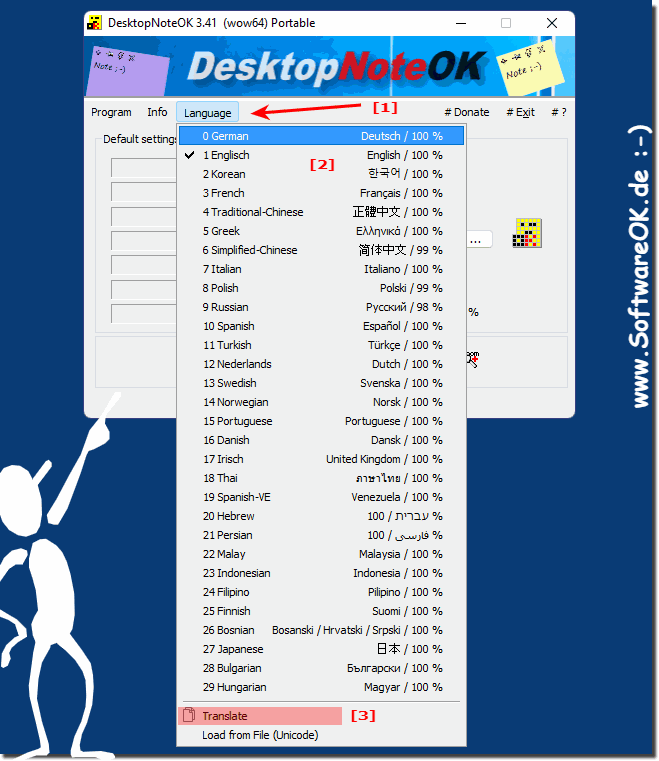
3.) What should I consider when changing the language in this desktop APP?
There's nothing major to note, you should of course choose the language you understand and can read!
You can change the language in the desktop sticky note tool at any time, but the tool recognizes the Windows system language and automatically switches to the most obvious language. If it doesn't happen automatically, you can change the language in the application as described above!
4.) More tips on language, region, ... on MS Windows OS!
When creating a note, the program creates a few notes outside of the screen area. It will be on 2 screens worked The problem with the correct positioning
The solution is easy an you can uninstall the Free Short Note Tool from Windows 11, 10, 8.1, or other MS-OS Content: 1. Quickly uninstall Desktop-Note-OK
If you slip in the transparency of the desktop note, the text looks quite to transparent for certain colors on Windows 11, 10, etc. To better recognize
This website does not store personal data. However, third-party providers are used to display ads, which are managed by Google and comply with the IAB Transparency and Consent Framework (IAB-TCF). The CMP ID is 300 and can be individually customized at the bottom of the page. more Infos & Privacy Policy ....