Software-OK
≡... News | ... Home | ... FAQ | Impressum | Contact | Listed at | Thank you |

  
HOME ► Windows 10 - Quick-Tip ► «««« 25 / 60 »»»»

Activate Seconds display in Task-Bar of Windows 10 / 11 Desktop!


The solution to activate Seconds display in the Task-Bar of Windows 10 Desktop!


The Windows 10 / 11 Taskbar clock can accurately display the exact time to the second. This feature requires a registry hack and works on Windows 10 / 11, whether in the Windows 10 / 11 Home and Pro OS, it has been tested and successfully verified at MS 10 / 11 OS. At any Problems please do a Windows 10 restart, please perform a correct Windows restart. Instead, Windows 7 users need a third-party utility to do this for example digital desktop clock.

Activate Seconds display in Task-Bar of Windows 10 Desktop!
  

Simply
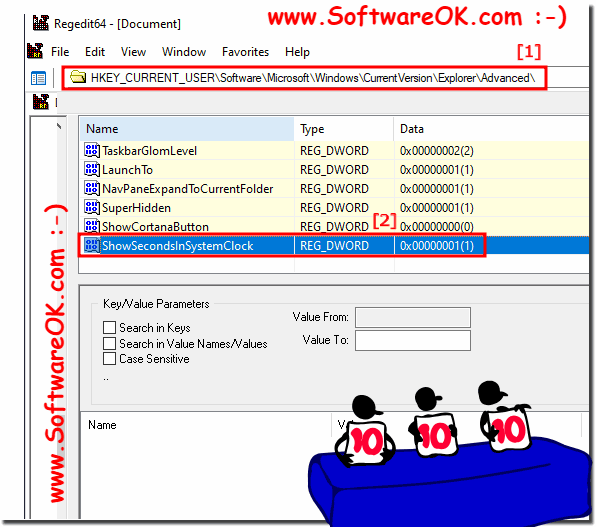
create the DWORD "ShowSecondsInSystemClock" in the registry under:

HKEY_CURRENT_USER\Software\Microsoft\Windows\CurrentVersion\Explorer\Advanced

And set the DWORD value to 1! (... see Image-1 Point 1 and 2)

(Image-1) Activate Seconds display in Task-Bar of Windows 10 Desktop!
Activate Seconds display in Task-Bar of Windows 10 Desktop!


This tip set the ShowSecondsInSystemClock value exactly as described here.
When you run the "Show seconds in the system clock" trick, the ShowSecondsInSystemClock value is set to 1. If you want to run the "Remove seconds from the system clock" trick, simply delete the ShowSecondsInSystemClock value from your registry. If you get curious about what these or other .reg files do, you can right-click and select Edit to see their contents in the editor.


-
▲ Back to the top ▲


Updated on: 6 July 2021 10:38 Windows
Keywords: quick, tip, activate, seconds, display, taskbar, windows, 11, 10, desktop, solution, clock, accurately, exact, time


Similar information on the page

Windows

... Enable Windows 8 Style Start Screen in Windows 10


The solution to enable the MS Windows 8 style Start Screen Menu in Windows 10, Home and Professional, is not in Windows 11 Anyone who has become
Windows

... Find Advanced display Settings on Windows 10 / 11 and server


The command to start / run advanced display Settings on Windows 10, and Windows Server 2019 / 2016
Windows

... Hot Tip Windows 10/11 Activate classic GodMode


Even under MS Windows 10 and 11 you can use the GodMode as an experienced user to unlock secret functions However, you can use this example,  and customize
Windows

... Windows 10 / 11 control system classic panel


The solution for Windows 10 "system classic panel" is via "control system command, also for MS Server OS
Windows

... All Printer Folder on Windows 11, 10, ...


A Quick-Tip as solution to open all Printer Folder on Windows 11, 10, Desktop OS, Home and Pro Info: If you Installing your own printer is not rocket
Windows

... Windows 10 and 11 activation slui 4 not working via phone system


The solution Windows 11 and 10 activation slui 4 not working via phone system you must enter a valid key from MS Windows 11, 10, 8.1 or 7 Content: 1.
Windows

... Send by email in the File Explorer on Windows 10 / 11


The solution to send files or folders by email  in the File Explorer on Windows 10 is great basic feature Attach attachments to e-mail: This is how it works


▲ Back to the top ▲


11 # APPs # Beginner # Desktop # Download # Explorer # File-System # Folder # Hardware # Install # Internet # Media # Monitor # Network # Office # Power-Options # Printer # Quick-Tip # Registry # Search # Security # Settings # Shortcuts # Software # Sound # Store # System # Tips # Update # User #


  + Freeware
  + Order on the PC
  + File management
  + Automation
  + Office Tools
  + PC testing tools
  + Decoration and fun
  + Desktop-Clocks
  + Security

  + SoftwareOK Pages
  + Micro Staff
  + Freeware-1
  + Freeware-2
  + Freeware-3
  + FAQ
  + Downloads

  + Top
  + Desktop-OK
  + The Quad Explorer
  + Don't Sleep
  + Win-Scan-2-PDF
  + Quick-Text-Past
  + Print Folder Tree
  + Find Same Images
  + Experience-Index-OK
  + Font-View-OK


  + Freeware
  + Q-Dir
  + DirPrintOK
  + FontViewOK
  + MeinPlatz
  + DesktopOK
  + IsMyMemoryOK
  + StressTheGPU
  + Brightness.Manager.OK
  + PaintOkay
  + PAD-s


Home | Thanks | Contact | Link me | FAQ | Settings | Windows 10 | gc24b | English-AV | Impressum | Translate | PayPal | PAD-s

 © 2026 by Nenad Hrg ERR2: softwareok.de • softwareok.com • softwareok.com • softwareok.eu
57.957 msec.


>> ☕ Buy SoftwareOK a Coffee ☕ <<


► Create a password reset disk for Windows 8.1 and Win 10 4 PW restore? ◄
► Can I still create files on Windows 11 that are not compressible? ◄
► Portable rules from 2018, Windows 10, 8.1, 7! ◄
► Help, where can i turn off the Windows 8 or 8.1, or shut down the MS Windows OS? ◄


This website does not store personal data. However, third-party providers are used to display ads,
which are managed by Google and comply with the IAB Transparency and Consent Framework (IAB-TCF).
The CMP ID is 300 and can be individually customized at the bottom of the page.
more Infos & Privacy Policy

....