Software-OK
≡... News | ... Home | ... FAQ | Impressum | Contact | Listed at | Thank you |

  
HOME ► Windows 10 - Media ► «««« 01 / 03 »»»»

Find and start Windows 10 media player!


The popular Windows Media Player is easy to find on Windows 10, 8.1, .... and MS Server 2022, ....!


I have integrated the Windows Media Player in the  Quad Explorer, which can serve as a preview for videos and media files, since the Windows 10 does not have the Windows Media Center in the standard installation, the Windows Media Player is on Windows 10 a very good player that can play mkv, avi, mp4, divix, flack, mp3, ... well!


TIP: ►►  The freeware MediaPlayerOK for Windows


1. Find and start Windows Media Player on Windows 10/11!
2. Activate WMP (if not installed)
3. Alternative modern media players from Microsoft
4. Set WMP as the default program
5. Troubleshooting: WMP won't open/is missing despite searching
6. Additional launch methods (keyboard shortcuts/PowerToys)
7. Conclusion/Recommendation


1.) Find and start Windows Media Player on Windows 10 / 11!


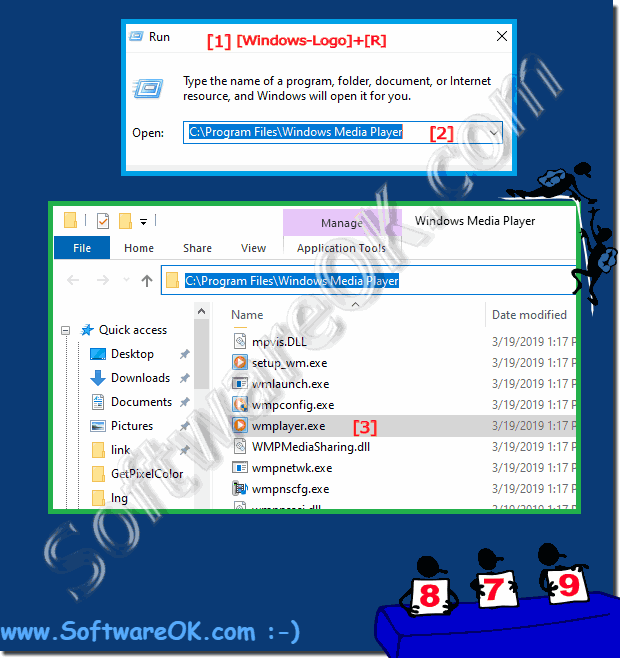
1. Simply open the directory "C:\Program Files\Windows Media Player"

2. and start the x64 variant of Windows Media Player

or:  
"C:\Program Files (x86)\Windows Media Player" the 32 bit version!

PS:

Alternatively, you can right-click the Start button to bring up the hidden quick access menu and select Run, or use the key combination Windows Key + R. Then type wmplayer.exe and press Enter.


(Image-2) FIND THE Media Player on Windows 10!
FIND THE Media Player on Windows 10!


Info:


Windows Media Player has not changed at all since the last update to version 12 in Windows 7. If you've recently upgraded from Windows 7 to 10 and aren't ready to use the new apps yet, you'll enjoy the familiar interface. It is obvious that Microsoft wants to give up some of the desktop programs and develop them as new universal apps.

-


2.) Activation of WMP (if not already installed)


The article mentions in the FAQs at the end that Windows Media Player is not installed by default in some Windows editions (especially the "N" versions for Europe). This would be an important sub-point:
* Installing/activating Windows Media Player: Step-by-step instructions via "Apps & Features" → "Optional Features" → "Add a feature" → "Windows Media Player". This is particularly relevant for users who are looking for it but can't find it.


3.) Alternative modern media players from Microsoft


The article mentions that Microsoft is focusing on "universal apps." You could clearly name and differentiate the modern alternatives:
* The "modern" Media Player app (Windows 11): Pre-installed by default, streamlined interface, better for touch and current codecs (like HEVC, if installed).
* "Movies & TV" (formerly "Groove Music"): Also a UWP player, often still present.
* Differentiation: When do you use the classic WMP (e.g., for CD ripping, library management, visualizations) and when do you use the modern apps (for quickly playing individual files)?


4.) Set WMP as the default program


The FAQ asks: "How do I set Windows Media Player as the default?" . This is a practical, standalone point:
* Set WMP as the default for media files: Instructions via "Settings" → "Apps" → "Default apps" → "Choose by file type" (e.g., for .mp4, .mp3) or "Choose by protocol" (e.g., http://).


5.) Troubleshooting: Windows Media Player cannot be opened / is missing despite searching.


Based on the many FAQs in the article, you could add a short troubleshooting section:
* Common problems and solutions:
* WMP was disabled by a Windows update.
* The executable file (`wmplayer.exe`) is present, but launching it via the menu doesn't work (broken shortcut).
* WMP cannot play certain files (e.g., MKV, FLAC) – Solution: Codec packs (with warning).


6.) Additional startup methods (keyboard shortcuts / PowerToys)


The article mentions `Windows + R` and `wmplayer.exe`. This can be expanded upon:
* Create your own keyboard shortcut: Create a desktop shortcut with `wmplayer.exe` and assign a custom keyboard shortcut (e.g., `Ctrl + Alt + W`).
* With PowerToys Run: If the user has PowerToys installed, simply type `Alt + Spacebar` → `wmp`.


7.) Conclusion / Recommendation


* For whom is the classic Windows Media Player still useful in 2026? (e.g., for users who want a simple, ad-free library without cloud requirements, or for playing audio CDs).
* Outlook: The article mentions that Microsoft actually wants to discontinue Windows Media Player. This suggests that it will still exist, but will no longer receive new features.


Updated on: 15 May 2026 12:11 Windows
Keywords: 2022, media, find, start, windows, player, popular, easy, server, have, integrated, quad


Similar information on the page

Windows

... Open quickly the microphone settings on all MS Windows OS


Under Microsofts Windows 10/11 you can open the microphone settings quickly and easily Anyone who likes to set / change the  Windows 10/11 volume mixer
Windows

... Open the Windows 10 or 11 disk management


It is easy to find and start the popular disk management, not only on Windows 11, 10, 8.1, but also on MS server systems 1. Start the advanced Windows
Windows

... Use Windows Live Writer on Windows 10/11


It is easy to use the Windows Live Writer on Windows 10/11 as well as MS Server 2019, 2016 Many have suspended blog maintenance for some time. One of the
Windows

... Can I have the 3D desktop clock start automatically on all Microsofts Windows OS


You can easily start the 3D desktop clock with Windows under MS Windows desktops and e.g. MS Server 2019, 1. As always, start the 3D desktop clock for
Windows

... Find and Start Remote Desktop Connection in Windows 10, how to?


Windows 10 also has a remote desktop connection that can be called up or used quite easily in the new Windows 10 operating system The solution is very simple
Windows

... Find EXE file of a program or APP on Windows 10 and 11


Its easy to find the EXE file of a program / APP on Windows 10 or on the new Microsoft Server 2022, 2019, Anyone who knows EXE FILE  may want to find
Windows

... Find and start the mobility center in Windows 11


The classic and popular mobility center under Windows 11 can be used, for example, to adjust the screen brightness or to see the battery status    1.


▲ Back to the top ▲


11 # APPs # Beginner # Desktop # Download # Explorer # File-System # Folder # Hardware # Install # Internet # Media # Monitor # Network # Office # Power-Options # Printer # Quick-Tip # Registry # Search # Security # Settings # Shortcuts # Software # Sound # Store # System # Tips # Update # User #


Questions for this:
  1. Still not finding Windows Media Player, I running Windows 10 editions Windows Media Player is not included unable to locate Windows Media Player?
  2. Where is Windows Media Player in Windows 10 In some editions of Windows 10, it's included as an optional feature that you can enable?
  3. The simplest way to find Windows Media Player is by clicking Windows Media Player and selecting the app?
  4. Windows media player for windows media player 11?
  5. Windows Media Player can be accessed by clicking Start, All apps, Windows See also Media Feature Pack for Windows 10?
  6. Simple Ways to Open Windows Media Player in Windows 10?
  7. Where is Windows Media Player in Windows 10 Expand the Windows Accessories folder?
  8. Install Windows Media Player Windows 10?
  9. Windows media player fxp for windows 10 64-bit?
  10. Windows Media Player in Windows 10 install?
  11. Searches related to Find and start Windows 10 media player?
  12. Windows 10 Tip Find Windows Media Player and Set it as, howto?
  13. Get Windows Media Player Windows 10 Help?
  14. How to locate and open Windows Media Player in Windows 10?
  15. The quickest way to check if you have Windows Media Player 12 the latest version installed?
  16. Images Download and start Windows 10 media player!?
  17. Windows Media player is removed by Windows updates, Media Player is missing in Windows 10?
  18. How To Disable or Enable Windows Media Player In Windows 10?
  19. Enabled is to open the Start, how to Download Windows Media Player 12 for Windows 10?
  20. How to Install Windows Media Player WMP on Windows 10?
  21. Windows Media Player in Windows 10?
  22. Windows Media Player in Windows 10?
  23. How To Open Media In Windows Media Player Windows 10?
  24. Windows media player for windows 10 32 bit?
  25. Windows 10 media player download?
  26. Windows Media Player in Windows 10.?
  27. Page navigation windows media player download?
  28. Windows Media Player in Windows 10 by the Start menu Unlike the Windows Media Player can play OneDrive files?
  29. How to Use Windows Media Player in Windows 10 added all the places Windows Media Player should search for media?
  30. How do I find Media Player on my computer?
  31. How to Make Windows Media Player Default in Windows 10?
  32. How to Install Windows Media Player in Windows 10?
  33. Does Windows 10 have Media Player?
  34. Windows media player 12 offline installer?
  35. Do I have Windows Media Player on my computer, what replaces Windows Media Player in Windows 10?
  36. I cant find the shortcut named Windows Media Player?
  37. Problem Windows Media Player Missing in Windows 10?


  + Freeware
  + Order on the PC
  + File management
  + Automation
  + Office Tools
  + PC testing tools
  + Decoration and fun
  + Desktop-Clocks
  + Security

  + SoftwareOK Pages
  + Micro Staff
  + Freeware-1
  + Freeware-2
  + Freeware-3
  + FAQ
  + Downloads

  + Top
  + Desktop-OK
  + The Quad Explorer
  + Don't Sleep
  + Win-Scan-2-PDF
  + Quick-Text-Past
  + RAMagic
  + DesktopDigitalClock
  + Find Same Images
  + Print Folder Tree


  + Freeware
  + Q-Dir
  + DirPrintOK
  + FontViewOK
  + WinScan2PDF
  + TheAeroClock
  + MeinPlatz
  + WinBin2Iso
  + DesktopOK
  + RAMagic
  + PAD-s


Home | Thanks | Contact | Link me | FAQ | Settings | Windows 10 | English-AV | Impressum | Translate | PayPal | PAD-s

 © 2026 by Nenad Hrg ERR2: softwareok.de • softwareok.com • softwareok.com • softwareok.eu
56.78 msec.


>> ☕ Buy SoftwareOK a Coffee ☕ <<


► Difference between 16-bit, 24-bit and 32-bit colors? ◄
► Print test pages under Windows, but how? ◄
► Insert images from the clipboard as a file into the file explorer? ◄
► What is the WDDM driver model of my GPU / graphics card? ◄


This website does not store personal data. However, third-party providers are used to display ads,
which are managed by Google and comply with the IAB Transparency and Consent Framework (IAB-TCF).
The CMP ID is 300 and can be individually customized at the bottom of the page.
more Infos & Privacy Policy

....