Software-OK
≡... News | ... Home | ... FAQ | Impressum | Contact | Listed at | Thank you |

  
HOME ► Windows Images - Run-Command ► «««« 01 / 01 »»»»

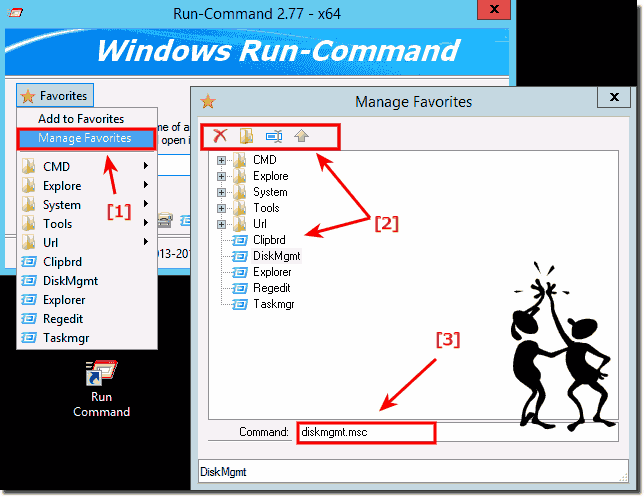
Comfortably manage the favorites and grouping by command!


Example Image how to comfortably manage the favorites and grouping by command, for Windows 10 / 8.1 Server 2016/2012!


Favorites ► Manage Favorites

  (... see Image-1)

Please always use ... the newest version of Run-Command for Windows or Windows Server! 

(Image-1) Manage the favorites and Commands!
Manage the favorites and Commands!
▲ Back to the top ▲


Updated on: 12 September 2017 20:29 Windows
Keywords: Windows, Server, 10, 8.1, 2012, 2016, command, images, comfortably, manage, favorites, grouping, example, image


Similar information on the page

Windows

... Keyboard shortcut Windows-R, in Run Command, how to change?


As default the keyboard shortcut Windows + R is provided for Run Command, but can be changed at any time If you want to change this, press the button ►
Windows

... A List of Windows Shell:Folders Commands?


Heres a little list of Windows shell:folder commands The shell folder commands is also supported in  Run-Command Please always use the newest version
Windows

... Create a new Favorite Run-Dialog Command, how to?


The solution is simple to create a new Favorite Run-Dialog Command Of course, you can also add frequently used commands and functions according to your
Windows

... Keyboard Shortcut to Run as administrator in RUN-Command Dialog?


The solution is extremely simple to start programs and commands as an administrator using the RUN command with a keyboard shortcut, why not   Contents:
Windows

... Hide when run: commands, favorite cmd-s in Run-Command - Windows 10, 11, 8.1, 7


The solution is simple to hide Run-Command Window when running commands or favorite commands Please enable this feature in Run Command  see Image-1
Windows

... Popup Menus in the File Manager in each explorer list view


Popup Menus in the File Manager Q-Dir Quad-File-Explorer for each explorer list view for MS Windows 11, 10, to Win XP   Content: 1. The desktop
Windows

... In Quad File Exoplorer, change the list view to details?


Here is an example how you can change the list view to Details in Q-Dir Contents: 1. List view in every file explorer for details 2. Advantages


▲ Back to the top ▲


See also : ... Run-Command FAQ
Back to : ... Run-Command Homeage


4ur-Windows-8-Mouse-Balls # AutoHideDesktopIcons # ClassicDesktopClock # Delete.On.Reboot # DesktopDigitalClock # DesktopSnowOK # ExperienceIndexOK # Find.Same.Images.OK # FontViewOK # IsMyHdOK # KeepMouseSpeedOK # MagicMouseTrails # MeinPlatz # PointerStick # Q-Dir # QuickTextPaste # Run-Command # TheAeroClock # WinScan2PDF #


  + Freeware
  + Order on the PC
  + File management
  + Automation
  + Office Tools
  + PC testing tools
  + Decoration and fun
  + Desktop-Clocks
  + Security

  + SoftwareOK Pages
  + Micro Staff
  + Freeware-1
  + Freeware-2
  + Freeware-3
  + FAQ
  + Downloads

  + Top
  + Desktop-OK
  + The Quad Explorer
  + Don't Sleep
  + Win-Scan-2-PDF
  + Quick-Text-Past
  + Print Folder Tree
  + Find Same Images
  + Experience-Index-OK
  + Font-View-OK


  + Freeware
  + StressMyPC
  + DesktopSnowOK
  + Delete.On.Reboot
  + IsMyTouchScreenOK
  + Print.Test.Page.OK
  + OpenCloseDriveEject
  + ColorConsole
  + IsMyLcdOK
  + DesktopDigitalClock
  + PAD-s


Home | Thanks | Contact | Link me | FAQ | Settings | Windows 10 | gc24b | English-AV | Impressum | Translate | PayPal | PAD-s

 © 2026 by Nenad Hrg ERR2: softwareok.de • softwareok.com • softwareok.com • softwareok.eu
51.802 msec.


>> ☕ Buy SoftwareOK a Coffee ☕ <<


► Time zone settings on MS Windows 11 OS! ◄
► Is the new Windows 11 really installed? ◄
► Translate text from clipboard! ◄
► 2 x quad explorer with separate settings! ◄


This website does not store personal data. However, third-party providers are used to display ads,
which are managed by Google and comply with the IAB Transparency and Consent Framework (IAB-TCF).
The CMP ID is 300 and can be individually customized at the bottom of the page.
more Infos & Privacy Policy

....