Software-OK
≡... News | ... Home | ... FAQ | Impressum | Contact | Listed at | Thank you |

  
HOME ► Windows Tip - DesktopOK ► «««« 04 / 16 »»»»

Desktop-OK symbol layout and positions save possibility on Windows 11, 10,8.1, ...!


Quick-Explain to symbol layout and positions save possibility on Windows 11, 10,8.1, ..., and Microsoft Server 2016, 2019!


Info:

►► Command line option to save or load!
►► DesktopOK settings and Desktop Icons Layout in The Windows Registry:
►► Where does the program DesktopOK save the file/data!


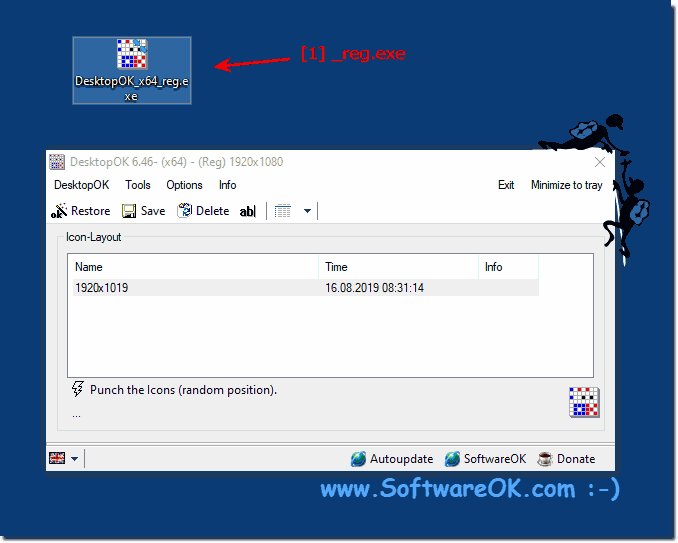
Example save in the Windows Registry on Windows 10!

(Image-1) Desktop-OK symbol layout and positions save possibility on Windows 10,8.1!
Desktop-OK symbol layout and positions save possibility on Windows 10,8.1!

-
▲ Back to the top ▲


Updated on: 9 July 2021 17:16 Windows
Keywords: desktopok, desktop-ok, symbol, layout, positions, save, possibility, windows, 10, 11, quickm, microsoft, serve, command, option


Similar information on the page

Windows

... Alt drag window function, drag, move, resize on Windows 11, 10, 8.1, ...


The practical Alt Drag window function, drag, move, resize on Windows 11, 10, 8.1, and MS Server 2019, 2016, etc It makes a lot of sense to use this
Windows

... Save the icon layout with date and time format via the command line


If requested by the user, the icon layout with date and time format can be saved on all MS Desktop and Server OS   If you want to save your icon layout
Windows

... Command line option to save or load the icons layout directly from a file?


Yes, you can use command line to save or load the desktop icons layout directly from a file From DesktopOK 1.57 an higher.   1. The examples to load
Windows

... Save the desktop OK window position in Windows 11, 10, 8.1, 7, ...


New from 6.48 in Desktop-OK is saving the window position regardless of whether Windows 11, 10, 8.1, 7, or MS Server OS   It is really very useful and
Windows

... Load and Save windows desktop Icon Layout from file quick restore


Easy and simple Load and Save windows desktop Icon Layout from file for a quickly restore of the Desktop Symbols Restore the Icons direct from "*.dok" file 
Windows

... Save electricity, save hardware, save money, save nature on all Windows


Although Windows can use various power-saving functions and even independently switch between several power profiles Content: 1. Nature-friendly under
Windows

... After Windows 10/11 update, the desktop icon save positions tool does not work


The solution after Windows 11 / 10 update, the desktop icon save positions tool does not work Rarely that after Windows 11 / 10 update the saving of the


▲ Back to the top ▲


See also : ... DesktopOK FAQ
Back to : ... DesktopOK Homeage

... DesktopOK Tip


3D.Benchmark.OK # AlwaysMouseWheel # AutoHideDesktopIcons # AutoPowerOptionsOK # ClassicDesktopClock # DesktopDigitalClock # DesktopNoteOK # DesktopOK # DontSleep # Edge-Chromium # ExperienceIndexOK # Find.Same.Images.OK # FontViewOK # GetPixelColor # GetWindowText # Internet # IsMyHdOK # KeepMouseSpeedOK # NewFileTime # OpenCloseDriveEject # OpenGL # PhotoResizerOK # Q-Dir # QuickMemoryTestOK # QuickTextPaste # Registry # ShortDoorNote # StressMyPC # System # TheAeroClock # Tools # Version # WinScan2PDF #


Questions for this:
  1. I.E. of any kind has been removed from this system, years ago, although the Control_Panel/Internet_Options are still accessible. I think we have discussed DesktopOK before, because I still recommend it to people I know who are as frustrated by Windows insane tendency to "reorganize" (read: squish!) all the desktop icons positions to fill the left side of the display; usually for no particularly obvious reason. One peeve I still have with DesktopOK is that it does not tell me where it is storing the saved Icon Layouts. It would be extremely helpful to know where to find the long list of them that were available yesterday and gone after I updated the NVIDIA GeForce drivers for this machine. The system is working just fine, otherwise, but I am not sure which will take longer: manually arranging the desktop icons the way I like them again, or trying to find the location where the list was available yesterday. DesktopOK ought to make it very clear to the user where it expects to save/restore the icon layouts whenever it is opened. Most popular software will allow the user to browse for files with whatever extension(s) it uses by default. There was only the one icon layout file I had just created when I searched for *.DOK using Windows. Where did all the others go? If DesktopOK made a point of asking the user whether the default (path} is acceptable or offering to let them set a {path}\{DesktopOK_layouts} directory of their own choosing, it might not be so difficult to find them many months later.?


  + Freeware
  + Order on the PC
  + File management
  + Automation
  + Office Tools
  + PC testing tools
  + Decoration and fun
  + Desktop-Clocks
  + Security

  + SoftwareOK Pages
  + Micro Staff
  + Freeware-1
  + Freeware-2
  + Freeware-3
  + FAQ
  + Downloads

  + Top
  + Desktop-OK
  + The Quad Explorer
  + Don't Sleep
  + Win-Scan-2-PDF
  + Quick-Text-Past
  + Print Folder Tree
  + Find Same Images
  + Experience-Index-OK
  + Font-View-OK


  + Freeware
  + IsMyLcdOK
  + DesktopDigitalClock
  + ClassicDesktopClock
  + PreventTurnOff
  + QuickMemoryTestOK
  + IsMyHdOK
  + AutoPowerOptionsOK
  + OneLoupe
  + TraceRouteOK
  + PAD-s


Home | Thanks | Contact | Link me | FAQ | Settings | Windows 10 | gc24b | English-AV | Impressum | Translate | PayPal | PAD-s

 © 2026 by Nenad Hrg ERR2: softwareok.de • softwareok.com • softwareok.com • softwareok.eu
52.699 msec.


>> ☕ Buy SoftwareOK a Coffee ☕ <<


► WINDOWS SETTING MS SETTINGS PRIVACY NOTIFICATIONS ◄
► What is adjustment? ◄
► What is an enter key? ◄
► What is a two-sided medal? ◄


This website does not store personal data. However, third-party providers are used to display ads,
which are managed by Google and comply with the IAB Transparency and Consent Framework (IAB-TCF).
The CMP ID is 300 and can be individually customized at the bottom of the page.
more Infos & Privacy Policy

....