Software-OK
≡... News | ... Home | ... FAQ | Impressum | Contact | Listed at | Thank you |

  
HOME ► Micro-Staff ► AlwaysMouseWheel 6.61

Scroll via mouse wheel even if the window is not in the foreground ergo focused!

About History Eula Images FAQ Download (112 KB) de DE en COM en EU
Update on: 4 May 2026
Suitable for : Windows 11, Windows 10, 8.1, 7, ... , Server 2012-2025, 2022, x64, x32, x86
-
Allows Mouse Wheel in inactive Window
... Download (112 KB)
... FAQ


Scroll via mouse wheel even if the window is not in the foreground ergo focused.


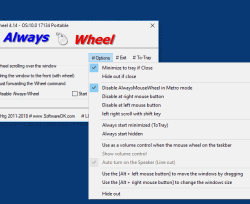
Always Mouse Wheel is a small portable Windows program this gives you the possibility when using the mouse wheel over any window (under the mouse pointer) to scroll via mouse wheel even if the window is not in the foreground e.g focused. 

Key Features in Always Mouse Wheel


◆ Send scroll commands to windows in the background
◆ Optional: brings the wheel window to the foreground.
◆ [Alt + left mouse button] to move the windows by dragging
◆ [Alt + right mouse button] to change the windows size
◆ Horizontal scrolling
◆ Volume control when the mouse wheel on the taskbar

Other Specifications:
◆ Freeware
◆ Low CPU and Resource usage
◆ Extremely small in size  
◆ Portable
◆ Multilingual

Easy to use, with great benefits


The program allows optionally: brings the wheel window to the foreground.

The inspiration was an user suggestion from Q-Dir 3.73 internal function. But this is a system-wide function for all Windows x64 and x32 systems without DLL and as a portable tool.

So you save a couple of clicks, or switching between windows.

The installation and removal


Always Mouse Wheel does not need to be installed, it can be easily started from the desktop without installation and can be used immediately on all Windows operating systems. Simply download the archive place by copy / paste on the desktop and start to use. If the program is not good for you, just quit the program and delete the AlwaysMouseWheel.exe.

Tip:
The AlwaysMouseWheel is absolutely sufficient, if you are familiar with portable applications, you can also use the Portable version. The x64 does not currently offer any functional advantages in this program, so the x32 can be used conveniently on al OS.

Supported Operating Systems


Always Mouse Wheel feature is Suitable for: Windows 12, Windows 11, Windows 10, Windows 10 Pro, Windows 10 Enterprise, Windows 10 Home, Windows 8.1, Windows 8.1 Enterprise and Pro, Windows 8, Windows 8 Enterprise and Pro, Windows 7, Windows 7 Enterprise, Windows 7 Home Basic, Windows 7 Home Premium + Professional, Windows 7 Starter + Ultimate, , X64, x86 and x32 all Windows, MS Windows Server 2019, 2016,2012, .

# AlwaysMouseWheel Versions History

New in version 6.61 // 4 May 2026
Adjustments to Always-Mouse-Wheel for the next Windows 11 build, important update to the language file in the Mouse Wheel app.


New in version 6.56 // 10 March 2026
Bug fixes in the Always Mouse Wheel application for all Windows operating systems
Important language file update in the Mouse Wheel app


New in version 6.55 // 23 October 2025
Minor bug fixes in the Always-Mouse-Wheel application for Windows 11 and 10 operating systems due to Smart Screen Lock.
Important update to the language file in the Mouse Wheel app


New in version 6.44 // 17 July 2025
Updated language files in the Always-Mouse-Wheel tool for all MS Windows versions.
Necessary adjustments for the Always-Mouse-Wheel app.


New in version 6.41 // 25 February 2025
Update of the language files in the Always-Mouse-Wheel application for all Windows
Once again important tests and adjustments for Windows 11 24H2


... complete Versions History


# AlwaysMouseWheel is multilingual and a popular program worldwide:
Language%   Translator Name
1Deutsch  / German 100 %   Nenad Hrg
2English  / Englisch 100 %   Nenad Hrg
3Russian  / Русский 100 %  
4Polnisch  / Polski 100 %   Arek Albiniak
5Portuguese  / Portuguese 48 %   Nuno Cruz
6Chinese-Simplified  / 简体 中文 96 %   Zepto Lee
7Nederlands  / Dutch 100 %   Fred de Vries
8Turkish  / Türkçe 100 %   Fatih Gorgulu
9Swedish  / Svenska 100 %   Åke Engelbrektson
10Traditional-Chinese  / 繁体 中文 100 %   Danfong Hsieh
11Hungarian  / Magyar 100 %   DoWtHen
12French  / Français 100 %   Franck Mouffi,Largo
13Italian  / Italiano 100 %   bovirus e Lorenzo Fassina
14Serbian  / Cрпски 100 %   OZZII
15Romanian  / Română 100 %   Stefan Arhip
16Korean  / 한국 100 %   ZN and 조남호
17Klingon  /  100 %   Mr Worf
18Spanish  / Español 100 %   Triote
19Thai  / ภาษาไทย 100 %   Chanchana Sornsoontorn
20Greek  / Ελληνικά 100 %   George Axaroglou
21Mexico  / Spanish 48 %   Alex Delgado
22Slovenski  / Slovenian 100 %   Vinko Kastelic
23Ukrainian  / Українська 79 %   Johny Zlo
24Czech  / Český 100 %   Milan Jaroš
25Brazilian-Portuguese  / Português do Brasil 100 %   Bacco
26Danish  / Dansk 75 %   Kim Christensen
27Japanese  / 日本 100 %   Satoushi, maboroshin
28Bulgarian  / Български 100 %   ^^V^^
29Spanish-VE  / Venezuela 100 %   Ricardo A. Rivas
30Hebrew  / עברית 100 %   DJ Israel
31Hindi  / हिन्दी 96 %   The Hindi Man
32Vietnamese  / Tiếng Việt (Việt Nam) 100 %   Huy
33Malay  / Malaysia 100 %   Washington
34Indonesian  / Indonesia 100 %   Indonesian Super Girl
35Filipino  / Pilipino 100 %   Abraham Lincoln
36Finnish  / Suomi 100 %   Otto
Program Keys:
  1. What are the benefits of a mouse wheel tool when working with multiple Windows 10, 11 and 12 in Windows 10, 11 and 12?
  2. What features are most important in a mouse wheel tool for designers?
  3. Which mouse wheel tools are best for graphics-intensive applications?
  4. What should I consider when installing a mouse wheel tool on my Windows 10, 11 and 12 PC?
  5. How can I optimize the performance of my mouse wheel on Windows 10, 11 and 12?
  6. What software allows me to scroll in the backgroand with the mouse wheel without switching Windows 10, 11 and 12?
  7. What is a mouse wheel tool for Windows 10, 11 and 12 and how can it increase my productivity?
  8. Windows 11, 10, 8.1, ... mouse over focus?
  9. Mouse hover scroll Windows 11, 10, 8.1, ...?
  10. Windows 11, 10, 8.1, ... mouse scroll wheel focus?
  11. MOUSEOVER SCROLLING Windows 11, 10, 8.1, ...?
  12. Windows 11, 10, 8.1, ... mousewheel always in focus?
  13. Mouseover scrolls?
  14. How can a mouse wheel tool make it easier to work with virtual machines in Windows 10, 11 and 12?
  15. How can I adjust my mouse wheel settings to suit the needs of my work style?
  16. Windows 11, 10, 8.1, ... utility scroll mouse over?
  17. How can I use the mouse wheel function to navigate between different documents faster?
  18. How can I adjust the scroll speed of my mouse wheel in different applications?
  19. How can I use mouse wheel tools to improve my user experience in Windows 10, 11 and 12?
  20. How can I optimize scrolling in backgroand applications with a mouse wheel tool?
  21. What are the benefits of a mouse wheel tool for graphic designers who work with multiple Windows 10, 11 and 12?
  22. How can I customize the mouse wheel control to save time when switching between Windows 10, 11 and 12?
  23. Can I use a mouse wheel tool to adjust the speed of the scroll commands?
  24. How can I customize mouse wheel functions in Windows 10, 11 and 12 to work more efficiently?
  25. How can I test the features of mouse wheel tools before installing them?
  26. How can I make the use of mouse wheel commands in presentations more efficient?
  27. Which mouse wheel software is best for creative work with multiple Windows 10, 11 and 12 open?
  28. How do mouse wheel tools support accessibility in Windows 10, 11 and 12?
  29. How do I choose the best mouse wheel tool for my professional needs?
  30. How can I combine mouse wheel tools with other software applications to maximize the benefits?
  31. How can I use the mouse wheel scroll function for web pages and documents at the same time?
  32. How can the use of mouse wheel commands be improved when working with large amounts of data?
  33. What tools are recommended for using mouse wheel functions in applications that run in the backgroand?
  34. How does a mouse wheel tool help me increase the efficiency of my daily tasks in Windows 10, 11 and 12?
  35. Windows 11, 10, 8.1, ... mouse on inactive window?
  36. Always mouse?
  37. Windows 11, 10, 8.1 scroll on hover?
  38. Sendmessage mouse wheel?
  39. Mousewheel inactive window windows?
  40. Use of mouse scroll?
  41. Which programs offer the best support for mouse wheel functions in backgroand applications?
  42. Better listview mouse wheel?
  43. How can I use a mouse wheel tool to improve my gaming experience?
  44. Always wheel?
  45. How can I optimize the mouse wheel settings for scrolling in PDFs?
  46. Sendmessage mouse wheel when mousewheel inactive window windows?
  47. How does the function work to send mouse wheel commands to backgroand Windows 10, 11 and 12?
  48. How can I anderstand the benefits of mouse wheel tools compared to traditional scrolling methods?
  49. How can I extend the functionality of my mouse wheel in Windows 10, 11 and 12?
  50. How can I design the integration of a mouse wheel tool into my existing software landscape?
  51. How can a mouse wheel tool help you focus better on complex tasks?
  52. How do mouse wheel tools help you work with Office applications?
  53. How can I achieve the best user experience with a mouse wheel tool in Windows 10, 11 and 12?
  54. always wheel, windows 8.1 / 10 scroll on mouse hover=1
  55. How do mouse wheel tools help with the use of programming environments in Windows 10, 11 and 12?
  56. Which free mouse wheel tools are most effective for Windows 10, 11 and 12 users?
  57. Mouseover Scrolling Windows Server 2012, 2016?
  58. What are the benefits of using mouse wheel tools for data analysts?
  59. What are the alternatives to Always Mouse Wheel for Windows 10, 11 and 12 users?
  60. Hover wheel download?
  61. Is there a way to activate the window with the mouse wheel when I scroll in it?
  62. How can I customize mouse wheel commands to make it easier to navigate online databases?
  63. Windows 11, 10, 8.1, ... scroll wheel on hover?
  64. Win 10 mouse scroll on hover?
  65. Can I use a mouse wheel tool to make multitasking more efficient?
  66. What are the best tips to optimize the scrolling function in the Windows 10, 11 and 12 operating system?
  67. How can I configure a mouse wheel tool to use it for games in Windows 10, 11 and 12?
  68. Scrolen where the mouse pointer is in inactive window?
  69. Windows 11, 10, 8.1, ... mouse over focus, mouse wheel program?
  70. How can a mouse wheel tool make it easier to use social media while working?
  71. windows 8.1 scroll inactive window=1
  72. What are the differences between different mouse wheel tools on the market?
  73. Scrolen where the mouse pointer is in inactive window?
  74. What features make a mouse wheel tool indispensable for office workers?
  75. Always wheel download?
  76. scroll inactive window, New alway wheel=1
  77. Can I use mouse wheel tools in conjunction with touchscreens?
  78. Windows 11, 10, 8.1, ..., 10 mousewheel always in focus?
  79. What are the most common problems when using mouse wheel tools in Windows 10, 11 and 12?
  80. How can I adjust the settings for the mouse wheel commands to improve the workflow?
  81. Windows 11, 10, 8.1, ..., 10 scroll on mouse over?
  82. Windows mouse wheel over?
  83. What are the most common problems that users experience with mouse wheel tools in Windows 10, 11 and 12?
  84. mouse focuse software=1
  85. Scroll wheel onmouseover?
  86. Mouse over window wheel scrolling?
  87. Mouseover scrolling in Windows-7 and Vista?
  88. What specific features should a good mouse wheel tool for Windows 10, 11 and 12 have?
  89. Windows 11, 10, 8.1, ... scroll without focus?
  90. How can I customize mouse wheel functions in my Windows 10, 11 and 12 environment?
  91. How does the configuration of a mouse wheel tool affect productivity in daily work?
  92. What keyboard shortcuts can I use with a mouse wheel tool?
  93. How does a mouse wheel tool help when using remote desktop applications?
  94. How do I choose the best mouse wheel tool for my unique work needs?
  95. How do professionals use mouse wheel tools to increase their efficiency?
  96. How can I improve the integration of mouse wheel commands into my daily workflows?
  97. How can I improve the scrolling function of my mouse wheel in Windows 10, 11 and 12?
  98. MOUSE WHEEL SOFTWARE SCROLL WINDOW HOVERING ABOVE=2
  99. Allways mouse wheel?
  100. multiple overscroll?
  101. What challenges can you face when using mouse wheel tools?
  102. Windows mouse wheel over?
  103. always scroll windows?
  104. How can I use scrolling without window activation efficiently with a mouse wheel tool?
  105. allways mousewheel?
  106. How can I optimize the use of a mouse wheel tool for web development?


* Scroll via mouse wheel even if the window is not in the foreground ergo focused!


About History Eula Images FAQ Download (112 KB) de DE en COM en EU
# Thanks+
Windows


  + Freeware
  + Order on the PC
  + File management
  + Automation
  + Office Tools
  + PC testing tools
  + Decoration and fun
  + Desktop-Clocks
  + Security

  + SoftwareOK Pages
  + Micro Staff
  + Freeware-1
  + Freeware-2
  + Freeware-3
  + FAQ
  + Downloads


  + Freeware
  + MultiClipBoardSlots
  + OnlyStopWatch
  + KeepMouseSpeedOK
  + NonCompressibleFiles
  + 4ur-Windows-8-Mouse-Balls
  + 12-Ants
  + Q-Dir
  + DirPrintOK
  + FontViewOK
  + PAD-s


Home | Thanks | Contact | Link me | FAQ | Settings | Windows 10 | English-AV | Impressum | Translate | PayPal | PAD-s

 © 2026 by Nenad Hrg softwareok.de • softwareok.com • softwareok.com • softwareok.eu
38.916 msec.


>> ☕ Buy SoftwareOK a Coffee ☕ <<


► Difference between SQL and NoSQL? ◄
► Set the standard boot operating system for Windows 11 PCs! ◄
► The rounded window corners are not displayed in Windows 11! ◄
► Difference between edge computing and cloud computing? ◄


This website does not store personal data. However, third-party providers are used to display ads,
which are managed by Google and comply with the IAB Transparency and Consent Framework (IAB-TCF).
The CMP ID is 300 and can be individually customized at the bottom of the page.
more Infos & Privacy Policy

....