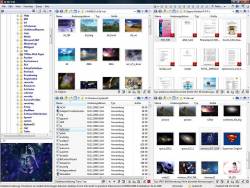
Q-Dir the Quad Explorer for Microsoft's Windows 11, 10, ... Desktop and Server!
Update on: 25 July 2024
Suitable for : Windows 12 & 11, Windows 10, 8.1, 7, ... , Server 2012-2025, 2022, x64, x32, x86
The Quad-Directory-Explorer makes your files and folders easy to manage, either installed or as a Portable Windows program as an alternative Freeware to Windows File Explorer.
Fast and easy access to your hard disks ergo advanced file management for network folders, USB-sticks, floppy disks and other storage devices Is the most popular tool from the category file management on Software OK!
Important! ► add to trusted application under Windows 10 from 2020, 2021!
Key features in the alternative File-Explorer
◆ File management in 4-window with tabs
◆ Folder size with extra information
◆ Color filter for files and folders
◆ Classic and modern address bar
◆ Directory structure with visible tree branches
◆ Print what you see in Explorer Views
◆ Based on the MS Windows OS File Manager
◆ Full Unicode Support
Other options and specifications
◆ Save folder combinations as favorites
◆ Moving and copying the data via "drag and drop"
◆ Mark selected folders and files
◆ Small program great in file management
◆ improved quad explorer file preview
◆ Multilingual
◆ Low System Resource usage
◆ Freeware
◆ ... and much more
TOP-INFO: ► Complete Deactivation of Grouping TOP-FAQ: ► Disable or Enable the Auto-Update
Warning! ► Once Q-Dir, always Q-Dir!
Why alternative file manager!
Q-Dir is a great alternative file manager for Windows with a amazing Quadro-View technique.
You don't have to give up your usual work habits, Drag'n Drops, view types, and other standard functions of your current file manager.
No! Q-Dir gives you extra useful functions to make you happy. Save time by reducing mouse-clicks and hand movements . Q-Dir does not have to be installed and can be executed easily from any location, such as the Desktop, and can be carried on a small USB-stick or other memory device.
Q-Dir's file management is based on MS Windows Explorer, but 4x plus Explorer Tab Views and with more functionality! More and more data makes for a larger file management challenge on you Windows OS.
Q-Dir allows you to save folder combinations as a favourite to open any time. Up to 64 folder combinations can be saved in a favorite, since each of the four windows is equipped with tabs (ie 4 x 16 tabs 4 x Tree View plus 4 x Address Bar), different colors for different file types ...
Frequently asked business question!
Yes Q-Dir is free for company, business and private use!
The first time you start Q-Dir you will be presented with a license screen.
The program is free and the license info is only displayed the first time (per PC).
Some Features!
- Favourites: Quick access to your most often used folders.
- Preview filter settings: ... Change preview filter settings?
- Drag&Drop: Move files by dragging in Q-views and other Explorers.
- Clipboard: Copy / Paste between Q-views and other Explorers.
- Folder-Types: ZIP, FTP, cabinet, network, system folders, shortcuts ...
- Views: Large icons, tiles, list, detail, thumbnail (Vista: extra large symbols) .
- Export: To XLS, CSV, TXT, HTML.
- Popup Menus: Desktop, My Computer.
- Screen magnifier: Enlarge anything on the screen.
- Color Filter: Different colors for different item types (e.g. *.log;*.txt).
- Highlight-Filter: Highlight files by extension type.
- File-Filter: Allows quick and easy filtering of files.
- Columns: Edit and save displayed columns.
- Quick-Link's: For fast folder access.
- Folder-Select: Fast & flexible folder selection address-bar / desktop menu / my-computer menu /...
- Multi-INI: Q-Dir saves settings to several INI files.
- Quadro-View technique: Quad-Pumped x 16 Tabs, (-: quad core + :-).
- Tree-View: Single and quadruple.
- Preview: Allows a quick preview.
- Portable: from v2.77 Q-Dir is portable.
- Printing: from v3.77 List, Details ...
- Folder size Column: from v3.83 file and folder size Column.
- Settings transfer: from v3.83 Improved transfer for folder and view settings.
- Faster edit: from v3.86 Faster edit or rename of files.
- File association: from v3.91 Internal file association rules.
- Tree View: Auto expand folders.
- Separate tree view for each explorer list view.
- and, much more........ ;)
# Q-Dir Versions History
| New in version 11.71.9 // 25 July 2024
New Code Sign Certificate for Q-Dir.exe
Important tests and verification of the Quad-File-Explorer under MS Windows Server 2025
Necessary adjustments made for the new operating system
Updates to the language files in the Q-Dir App
| New in version 11.71 // 10 July 2024
Address bar optimizations to make navigation easier and improve usability.
Better support for long path names and special characters.
UI tuning and improvements for a more intuitive and appealing design.
| New in version 11.69 // 1 July 2024
Important update of the language files
Update due to false / incorrect virus message on MS Windows 11 and 10
Improved access to various media, SD cards and network folders
| New in version 11.68 // 10 June 2024
Important update of the Q-Dir language files
General corrections and small fine-tuning
Optimization and various fixes under Windows 11
| New in version 11.67 // 6 June 2024
Once again, some fixes have been made to optimize your List View experience on Windows 10 and 11.
Minor tweaks and language files updated to ensure Quad File Explorer runs smoothly.
Thanks for your continued support!
|
... complete Versions History
| # Q-Dir is multilingual and a popular program worldwide: |
Program Keys:
Supported Operating Systems:
Windows 10 - Pro / Enterprise / Home,
Windows 8.1 - Enterprise / Pro,
Windows 8 - Enterprise / Pro,
Windows 7 - Enterprise / Home Basic / Home Premium / Pro / Starter / Ultimate,
Windows Vista - Enterprise / Ultimate / Business,
Windows XP - Home / Pro,
Windows Server - 2000-2008 / 2012 / 2016,
Windows 98.
(x32/x64) - All versions of Windows.
Listed at:
www.portablefreeware.com // punto-informatico.it // softpedia.com // dinside.no // majorgeeks.com // ghacks.net // freeware-guide.com // ... and much more ;-)
  
Should I use 1, 2, 3 or 4 File Explorer, what is better, is a important question!
* Q-Dir the Quad Explorer for Microsoft's Windows 11, 10, ... Desktop and Server!
# Images+ # Info+ # Thanks+
|

 DE
DE COM
COM